
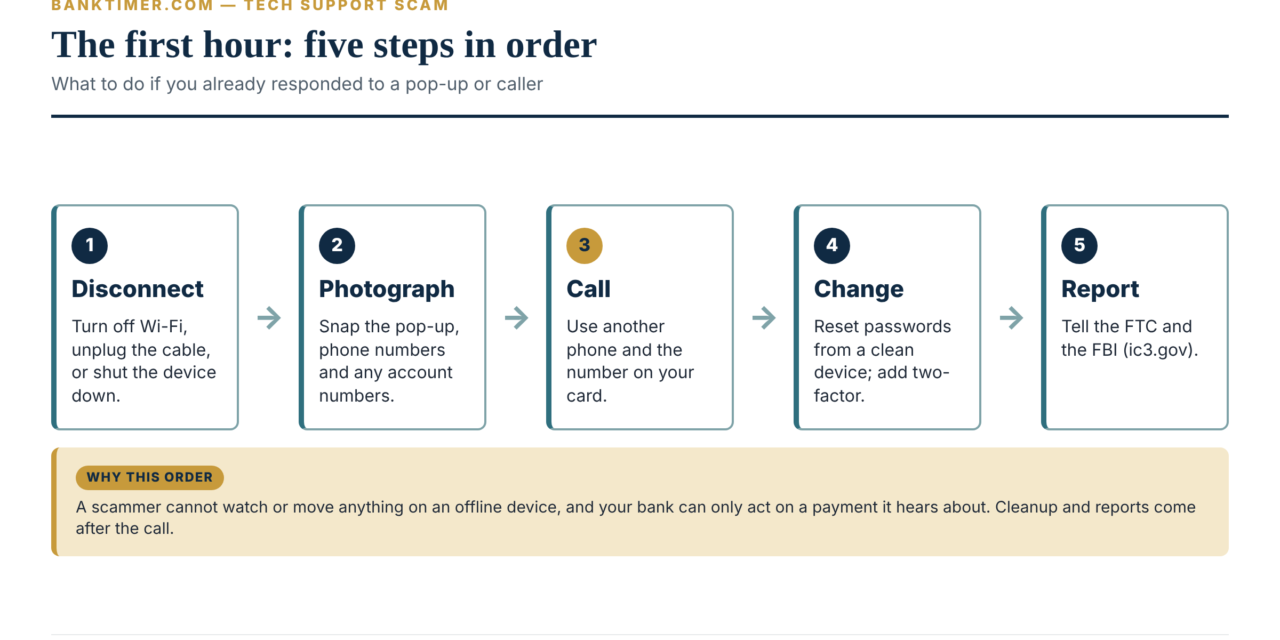
A tech support scam is a fake technical problem used to get you to pay, hand over bank or card details, or give a stranger remote control of your device. If you already responded, disconnect the device from the internet, then call your bank or card issuer from a different phone and say you were tricked into giving remote access. Use the number on your card, not one the caller gave you.
The biggest variable is speed, because wires, gift cards and crypto are hard to reverse. The main exception is that a payment you sent yourself is treated differently from one the scammer took. Next, change passwords from a clean device and report the scam to the FTC and the FBI.
Disconnect first, talk second. Turn off Wi-Fi or unplug the network cable. A scammer cannot watch your screen or move money if the device is offline.
Call the real number. Use the number on the back of your card or on your statement. Anything a pop-up or caller gave you leads back to the scammer.
How you paid decides your options. A card dispute, a debit card error claim, a wire recall and a crypto ATM deposit follow different rules and clocks.
A tech support scam has three common doors. A fake pop-up, an unexpected call or text, and a fake refund all lead to the same ask: remote access, then a bank login.
Older adults lose the most, but not only older adults. In FBI data for 2025, people 60 and older reported about $1.04 billion in tech and customer support fraud losses.
Recovery offers are a second scam. Anyone who contacts you and promises to get your money back for a fee is working from a list of past victims.
Tech Support Scam Triage: What to Do in the First Hour
If you are reading this because it just happened, start here and skip the background. Everything after this section explains why these steps work against a tech support scam and what comes next. Time matters most in the first hours, because money that has left your account is easiest to stop before the receiving bank moves it again.
This is general information, not legal advice. The right first call depends on how you paid, so we sort the situations below.
Step 1: Cut the connection
If a stranger might still be connected to your computer, break the link before you do anything else. Turn off Wi-Fi, unplug the network cable, or put a phone in airplane mode. If the screen is frozen or the mouse is moving by itself, hold the power button until the device shuts down.
Microsoft’s guidance for its remote tool says to disconnect from a session immediately if you suspect the person connecting is malicious. A hard shutdown is crude, but it ends a live session faster than hunting for the right window.
Do not log in to your bank, email or any other account on that device again until you have cleaned it.
Step 2: Take a few photos before you clean up
Use your phone to photograph the pop-up, the phone number, any website address, and the screen the caller had you open. Write down the caller’s name, the number that called you, and any amounts or account numbers they mentioned. Do this in two minutes, not two hours.
These details help your bank and later help investigators. The FBI’s reporting guidance asks for the name of the person or company, the communication methods and any account numbers the funds were sent to. If you cannot save the screen, writing it down still counts.
Step 3: Call your bank or card issuer from a different phone
Use a phone the scammer has not touched, and dial the number printed on the back of your card or on your statement. Do not use a number from the pop-up, from caller ID, or from anyone who offers to “transfer” you to your bank.
Say three things plainly:
- “I was tricked into giving a stranger remote access to my computer.”
- “I did not authorize these transactions” (if the scammer moved money or used your card).
- “Please lock online access, stop anything pending, and tell me what you can recall.”
Then ask for a reference number and the name of the department handling it. The FTC says that for bank transfers and Zelle payments, you should contact your bank right away and ask them to reverse the payment.
Which situation are you in?
The table sorts the most common outcomes by what you did, who to call first, and how urgent it is. The key insight is that the first call changes with the payment method. A card issuer, a gift card company and a crypto ATM operator each hold a different lever.
| What happened | Call first | What to say | How urgent |
|---|---|---|---|
| Clicked a pop-up or called the number, gave nothing | Nobody yet | Close the window, run a security scan, report it to the FTC | Low, but scan the device |
| Gave remote access, no money or bank sites involved | Device maker or a trusted repair shop | Ask for help removing remote tools; change passwords from a clean device | Same day |
| Gave remote access and the scammer saw bank or card sites | Your bank and card issuer | “Remote access while I was logged in. Lock the account and issue new numbers.” | Within hours |
| Paid with a credit card | Card issuer | Report the charge as unauthorized or a billing error | Same day; written notice within 60 days |
| Paid with a debit card or bank transfer | Your bank | Report unauthorized or tricked payments; ask for a reversal | Within hours |
| Sent a wire | Your bank’s wire or fraud department | “Fraudulent wire. Please request a recall from the receiving bank.” | Within hours |
| Bought gift cards and read out the numbers | The gift card issuer | “A scammer got the card number and PIN; please freeze the balance.” | Within hours |
| Used a crypto ATM or exchange | The ATM operator or exchange | Report the transaction as fraud and ask for a reversal | Within hours |
| Mailed cash or handed cash or gold to a courier | U.S. Postal Inspection Service or the carrier; local police for in-person pickups | Report the package or the pickup | Immediately |
The FTC’s recovery guidance for each payment type matches this table: contact the card issuer, bank, payment app, wire company, gift card company or crypto platform, tell them a scammer tricked you, and ask for a refund. For cash sent by U.S. mail, the FTC lists the Postal Inspection Service at 1-877-876-2455.
What to avoid in the first hour
Three mistakes show up again and again, and each one gives the scammer a second chance.
- Calling the number back. The caller may say the “problem” is not fixed or that your refund is stuck. Do not answer.
- Paying a recovery fee. Someone may call or message within days offering to get your money back. The FTC says refund and recovery scammers work from lists of past victims.
- Wiping the device before you save the details. A reset is often the right fix later. First photograph the screens and write down the numbers.
You can come back to this section at any point. The rest of the guide covers how a tech support scam works, what your legal protections are, how to clean up the device and accounts, and how to avoid a repeat.
What a Tech Support Scam Is and How Big It Has Become
A tech support scam is a fraud built around an invented computer problem. The scammer claims your device is infected, hacked, expired or overcharged. Then they offer to fix it, for a fee, with remote control of your screen. The repair never happens because there was no problem to repair.
In a typical tech support scam, the fee is rarely the real prize. Once a stranger sees your screen, they can look for the account worth emptying. That is why a “$299 antivirus renewal” can turn into a five-figure loss within days.
What the scammer is really after
Most versions chase one or more of four goals:
- A payment for fake service. Often by card first, then by a method that is harder to reverse.
- Remote access. This shows them your screen, your open tabs and, in some cases, your email and text messages.
- Login details and card numbers. Sometimes you type them into a spoofed site while they watch.
- A bigger transfer. The FTC describes callers who claim your identity was hacked, hand you off to a fake “official,” and tell you to withdraw money or buy gold.
The scale in FBI and FTC data
The FBI’s Internet Crime Complaint Center (IC3) tracks “Tech/Customer Support” fraud as its own category. In its 2025 annual report, IC3 lists 47,794 complaints and $2,134,675,818 in reported losses. Only investment fraud and business email compromise ranked higher by loss.
Losses have more than doubled in two years even though complaints grew only about 27%. In other words, victims are losing more per incident. The table shows the trend and our own division of the reported totals.
| Year | Complaints | Reported losses | Average loss per complaint (Banktimer calculation) |
|---|---|---|---|
| 2023 | 37,560 | $924,512,658 | about $24,600 |
| 2024 | 36,002 | $1,464,755,976 | about $40,700 |
| 2025 | 47,794 | $2,134,675,818 | about $44,700 |
The average rose about 80% from 2023 to 2025. An average is not a typical case, and a few very large losses pull it up. Still, the direction is clear: this category has shifted from small fees toward drained accounts.

Who loses the most
Older adults carry the heaviest share. IC3 recorded 21,333 complaints from people 60 and older in 2025, with about $1.04 billion in losses. That is roughly 45% of complaints and 49% of losses in the category.
The picture is not limited to older adults, though. By our math, the average reported loss per complaint was about $48,800 for people 60 and older and about $51,400 for people 50 to 59. Younger groups lost less per complaint: about $24,500 for ages 30 to 39 and $15,000 for ages 20 to 29.
The FTC’s data covers a different pool: consumers who reported to the FTC. Across all fraud types, the agency says it received 3 million fraud reports in 2025, with $15.9 billion in reported losses. Its December 2025 report on older adults says people 60 and older reported $159 million lost to tech support scams in 2024 and were five times more likely than younger people to report losing money to a tech support scam. The FTC and IC3 datasets measure different things, so do not add them together. Both rely on victims choosing to report.
Cryptocurrency shows up in the biggest losses
IC3 counts 17,355 tech and customer support complaints with a cryptocurrency link, with losses of about $1.23 billion. That is 36% of complaints but 57% of dollars. Crypto-linked cases averaged roughly $70,700 per complaint. Money sent by crypto is the hardest to pull back, which is part of why scammers steer victims there.
The Three Versions: Pop-Up, Call-Back and Refund
The tech support scam has dozens of scripts, but three entrances cover most of what readers describe. They differ in who makes first contact and what the scammer asks for. They converge on the same step, which is getting you to hand over control or credentials.
Version 1: The fake pop-up
A pop-up fills your browser with a warning. It may blare an alarm, show a “virus detected” message and put a toll-free number in large type. Some versions lock the browser so the window will not close.
The FTC puts the rule simply: real security warnings will never ask you to call a phone number. Microsoft says error and warning messages from Microsoft never include a phone number. If the message gives you a number to call, treat that as proof it is a scam.
Closing the window is usually a matter of quitting the browser rather than clicking the page. On Windows, open Task Manager and end the browser. On a Mac, use Force Quit. When you reopen, do not restore the previous tabs. These are practical steps, not rules from a regulator.
Version 2: The unexpected call, text or “call-back”
In this version the scammer reaches you first. A caller says they are with Microsoft, Apple, your internet provider or a security company. If you have searched “Microsoft calling me scam,” the answer is short: Microsoft states that it does not send unsolicited email or make unsolicited phone calls to offer computer repair. The FTC says legitimate tech companies do not contact you by phone, email or text about a problem with your computer.
The call-back variant adds a twist. An email or text says you were charged hundreds of dollars for a renewal from a brand like Geek Squad, McAfee or Norton. It gives you 24 hours to call and dispute the charge. You place the call, so it feels safe. The FTC describes what comes next: the caller asks for remote access and sends you to a spoofed website to enter bank or card details.
Search ads and fake support pages work the same way. If you searched for a company’s help line and clicked a sponsored result, the number may belong to a scammer. The FTC warns that scammers try to get their sites into search results and display ads.
Version 3: The refund
The refund script flips the story. You are told you are owed money, or that you were charged by mistake. The FTC describes the pattern: after getting remote access, the caller says you were refunded too much and must pay back the difference.
The pressure comes from a feeling of fairness. You did not ask for the money, and you want to return it. But if the “extra” money never arrived from an outside source, you are being asked to pay out of your own pocket. We work through the numbers in the cost section below.
A related trap follows many a tech support scam. The FTC warns that scammers contact people who have already lost money and offer to recover it for an upfront fee. We cover that in the recovery section.
When it escalates: the “Phantom Hacker” pattern
Some cases do not stop at a fee. In a September 2023 public service announcement, the FBI described a three-phase scheme it called the Phantom Hacker scam:
- Tech support imposter. The caller gets you to install remote software, runs a fake scan and asks you to open your financial accounts to find the “most valuable” one.
- Financial institution imposter. A second caller claims a foreign hacker is in your accounts and tells you to move money to a “safe” account.
- Government imposter. A third voice, posing as a federal employee, reinforces the story and pushes funds to a new account.
The FBI said IC3 received about 19,000 tech support complaints in the first half of 2023, with losses above $542 million. Victims over 60 made up almost half of those reporting and 66% of the losses. Our guide to the bank impersonation scam covers the second phase in detail.
The three versions side by side
The table compares how each version starts, what it asks for, and the clue that gives it away. The decision-driving insight is that every version needs you to act on contact you did not request. The contact is the red flag, not the details of the story.
| Feature | Pop-up | Unexpected call or text | Refund |
|---|---|---|---|
| Who makes first contact | A web page | The scammer | The scammer, or you after a fake notice |
| Typical hook | “Virus detected, call now” | “Your computer is sending errors” or “your renewal was charged” | “You were overcharged” or “we refunded too much” |
| First ask | Call a number | Install a tool or visit a site | Log in to your bank to “see” the refund |
| Payment pushed | Card first, then gift cards or crypto | Card, wire or gift cards | Return of the “excess” by gift card, crypto, wire |
| Giveaway | A phone number inside a security alert | Unrequested contact about your device | A refund you never requested |
| Best response | Close the browser; ignore the number | Hang up; contact the company yourself | Check your balance on another device; hang up |

What Remote Access Actually Exposes
“I gave a scammer remote access” is one of the most common ways readers describe the moment a tech support scam went wrong. The phrase covers a wide range, from thirty seconds of mouse movement to hours of control. What you lost depends on what was on your screen and what you typed while they watched.
How a remote session works
Remote support tools let one person see and control another person’s screen. Microsoft’s Quick Assist is an example. The helper generates a time-limited security code and shares it by phone. You enter it, approve screen sharing, and then choose whether to let the helper take control.
Microsoft’s documentation is blunt about the risk. It says anyone who controls your device can take actions on it and potentially install malicious applications. It also advises you to allow a connection only if you started the interaction by contacting Microsoft Support or your own IT staff.
A tech support scam does not need anything fancy. A free, legitimate tool is enough, because you are the one who opens the door.
What the scammer can see and do
Think of a remote session as the scammer sitting at your desk. Whatever shows on the screen is visible to them. That includes anything you open while connected.
- Open tabs and pages. Bank sites, email, shopping accounts and saved logins that display on screen.
- What you type. If you enter a password while connected, assume they saw it.
- Codes sent to the same device. A one-time passcode that pops up on a synced phone or computer is visible if it appears on the shared screen.
- Files and downloads. They can open folders and, with control, copy or install things.
- Installed software. Microsoft advises uninstalling anything the scammers had you install, running a full scan and considering a device reset.
The FBI’s description of the first phase of the Phantom Hacker scam adds a pattern worth knowing. The scammer runs a fake virus scan and asks you to open your financial accounts, supposedly to check them. That request is a reconnaissance step, not a repair step.
What a session does not do by itself
A remote session is not an automatic bank robbery. Moving money from your bank usually needs a login, and often a second factor such as a text code. The risk rises sharply when you log in yourself while connected, read out a code, or approve a prompt on your phone.
That distinction matters for your bank conversation. If the scammer took money using your credentials, say so. If you were walked through sending the money yourself, say that too, because the rules differ. We explain how in the next section.
What you shared and what to do about it
The table maps common situations to the exposure and the fix. The insight is that “remote access” alone and “remote access plus a login” call for very different responses.
| What happened | What it may expose | What to do |
|---|---|---|
| Remote session, you opened nothing sensitive | Files, browsing history, a foothold for installed software | Disconnect, scan, remove unknown apps, consider a reset |
| You logged in to your bank while connected | Your bank password, balances, account numbers | Call the bank, lock online access, change the password from a clean device |
| You read out or approved a one-time code | A second factor for that login | Treat the account as taken over; ask the bank to reset credentials |
| You gave a card number | A card that can be charged | Ask the issuer to cancel and replace the card |
| You gave a Social Security number or ID images | Identity theft risk | Report at IdentityTheft.gov; consider a credit freeze |
| You gave your email password | Resets for other accounts | Change it from a clean device; check forwarding rules and recovery options |
| You installed an app or browser extension | Ongoing access or tracking | Uninstall it; scan; reset the device if you cannot be sure |
If you want the bank-account side in more detail, see our guide to bank account takeover, which covers what banks check after credentials are stolen.
Will Your Bank or Card Issuer Cover a Tech Support Scam Loss?
The honest answer is that it depends on how the money left. Federal law gives strong protections for some payments and little for others. Bank policy and your account agreement can add protections, but they cannot take away what the law gives you.
Below, we separate federal law, bank or issuer policy and payment-type limits so you can see which is which.
Credit cards: the strongest position for most people
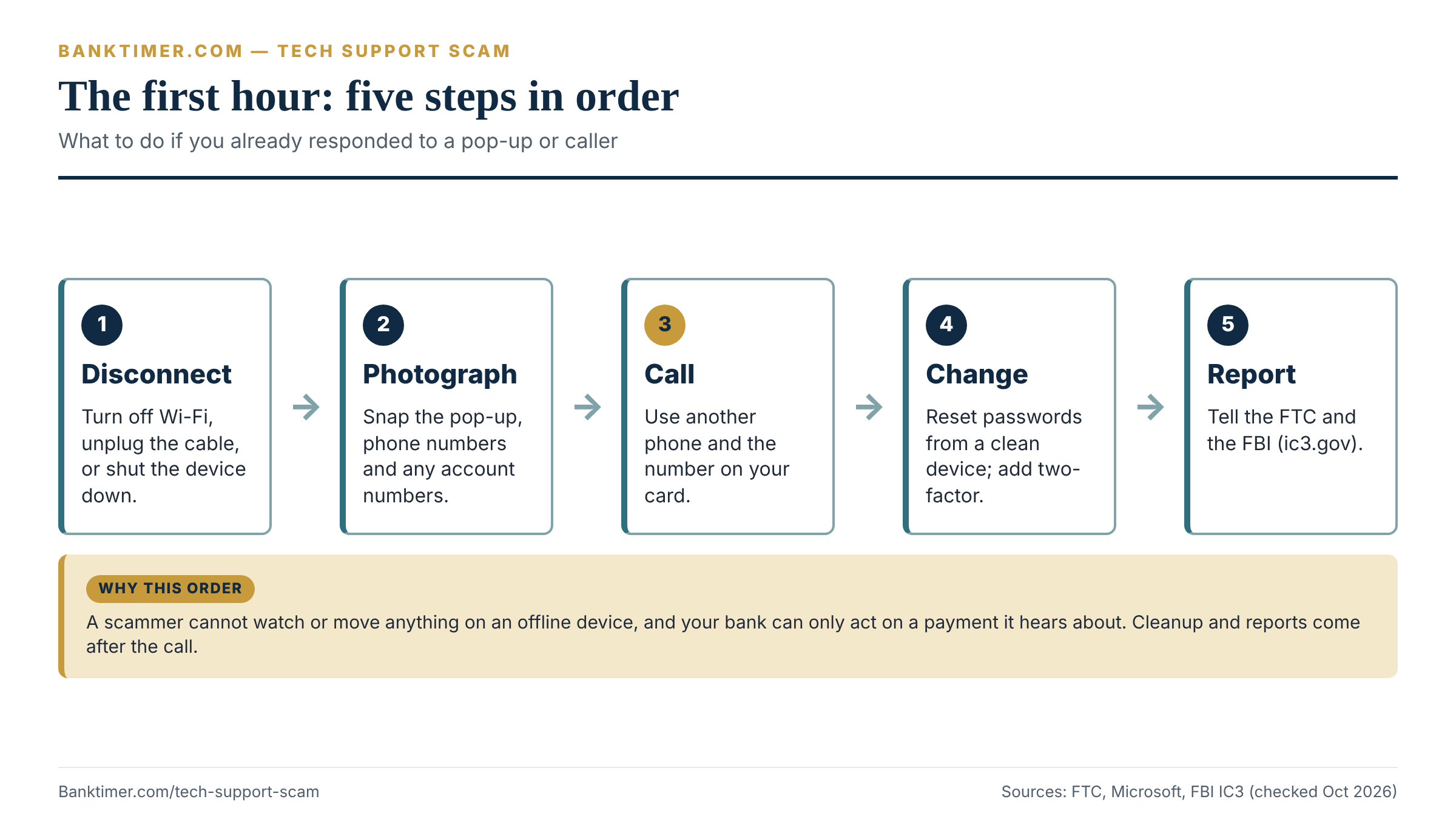
If you paid a scammer with a credit card, you have the most favorable footing. The federal billing error rules in Regulation Z cover charges for unauthorized use and other billing errors. Under 12 CFR 1026.13, your written notice must reach the issuer within 60 days after it sent the first statement showing the error. The issuer must acknowledge your notice within 30 days. It must finish resolving the dispute within two complete billing cycles, and no later than 90 days.
One caution applies. Whether a use was authorized is decided under state or other applicable law. If you knowingly typed in your card number to pay for fake service, the issuer may treat the dispute differently from stolen-card fraud. Describe it accurately: you paid for a service that was never delivered because you were deceived.
Debit cards and online banking: Regulation E
Debit cards and most electronic transfers from a bank account fall under the Electronic Fund Transfer Act and Regulation E. Our Regulation E guide covers the rule at length, and the debit card fraud guide covers card-specific steps. Three points matter here.
First, an unauthorized transfer is one initiated by someone other than you without actual authority. The CFPB’s Regulation E FAQs say that if a consumer is tricked into sharing login details, codes or card numbers, such as by a caller posing as the bank, a resulting transfer is an unauthorized electronic fund transfer. The CFPB also says a consumer who is fraudulently induced to provide account information has not furnished an access device under Regulation E.
Second, negligence is not a defense for the bank. The CFPB says an institution cannot use consumer negligence to impose greater liability than Regulation E permits. Your agreement also cannot waive these rights.
Third, the clock is short. The CFPB’s consumer guidance says to report unauthorized transactions as soon as you find them, and no later than 60 days after the statement is sent. If you report a lost or stolen card, PIN or security code within two business days, your liability is generally capped at $50. After that it can reach $500. Past 60 days, you can be liable for later transfers the bank shows would have been prevented by timely notice.
Where protection is weaker: payments you sent yourself
Here the rules get harder. Suppose the caller walked you through sending a wire, a Zelle payment or a bank transfer. You pressed the button, so the bank may call the transfer authorized.
The CFPB’s FAQ page does not say whether a payment you send yourself after being deceived is an error or an unauthorized transfer. So we cannot promise a result. Banks differ, and so do outcomes. You should still report it quickly, ask for a reversal, and file a complaint with the CFPB if the answer seems wrong.
Wire transfers add another limit. Regulation E excludes transfers through Fedwire and similar systems, in the form that 12 CFR 1005.3(c)(3) describes. That means a wire recall request to the receiving bank is usually the main tool, and its success depends heavily on speed.
Gift cards, crypto and cash
These payment types have the thinnest protection. The FTC says gift card issuers, crypto exchanges and ATM operators are the first calls, and that crypto payments have fewer legal protections. For cash sent by mail, the Postal Inspection Service can sometimes intercept a package that has not been delivered. Our guides to gift card scams and the crypto ATM scam go deeper on each.
How each payment method compares
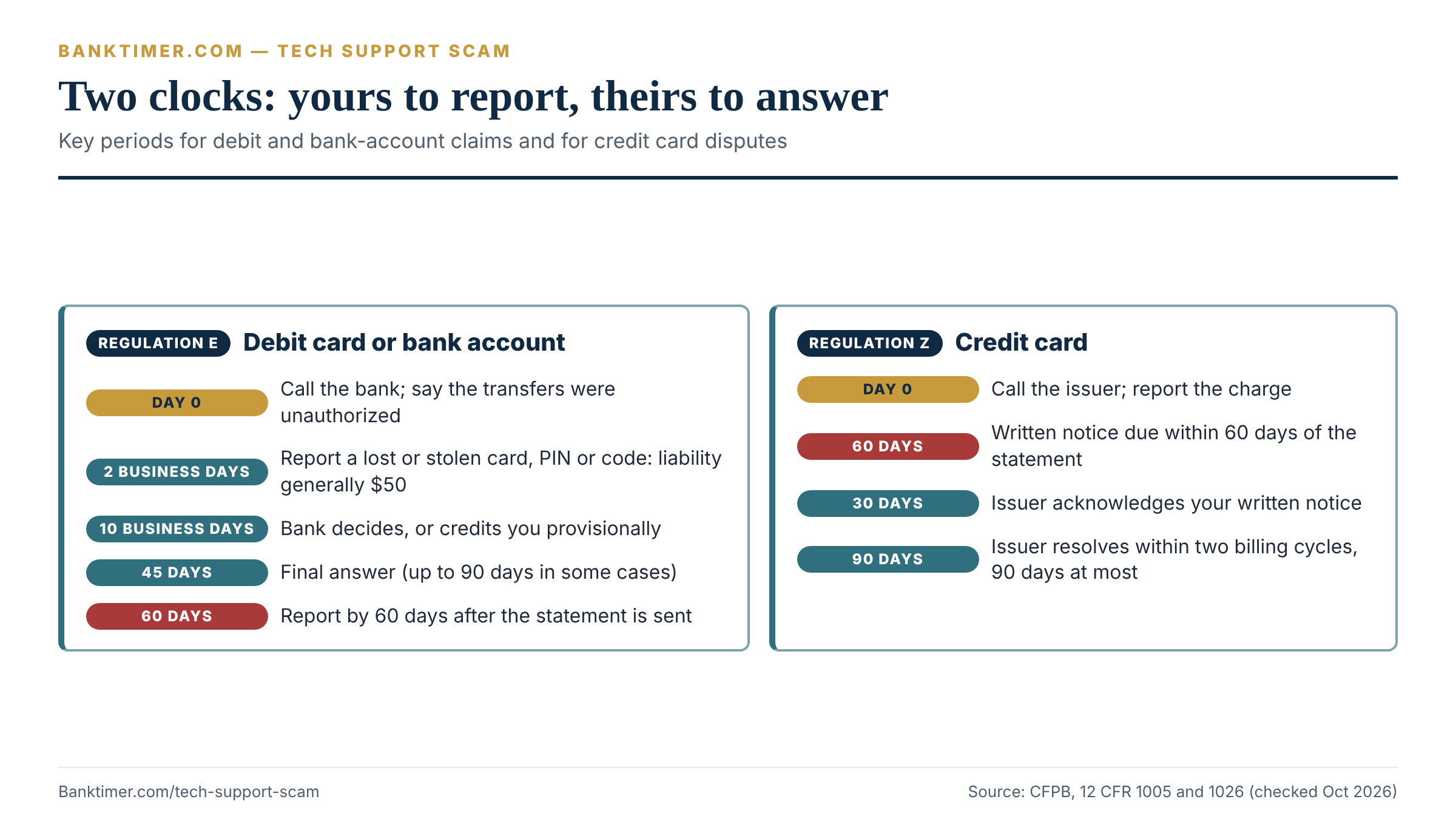
The table compares the main sources of protection and the practical window for acting. The strength ratings are Banktimer’s judgment, not a legal guarantee.
| Payment method | Main source of rights | Key deadline | Practical strength |
|---|---|---|---|
| Credit card | Regulation Z billing error rules; issuer policy | Written notice within 60 days of the statement | Strongest |
| Debit card used by scammer | Regulation E; bank policy | Report ASAP; 60 days from the statement | Strong if treated as unauthorized |
| Scammer logged in with your credentials | Regulation E (CFPB FAQ on tricked credentials) | Same | Strong, but explain clearly |
| Transfer or Zelle you sent | Bank policy; outcome varies | Same day if possible | Mixed |
| Wire | Bank wire agreement; recall request | Within hours | Weak to mixed |
| Payment app | App policy; Regulation E may apply | Report immediately | Mixed |
| Gift card | Issuer policy | Within hours | Weak |
| Crypto or crypto ATM | Operator policy; some state laws | Within hours | Weakest |
A worked example of the 60-day rule
Assume a scammer used your login to send $4,200 out of your checking account on October 22, 2026. Your bank mailed the statement showing it on November 1. Sixty days later is Thursday, December 31, 2026.
If you report by that date, the $4,200 transfer is protected as an unauthorized transfer. Now assume you wait. On January 8, 2027, the scammer, who still has your password, sends another $1,700. If the bank shows that timely notice would have prevented it, you could be liable for that $1,700. The first $4,200 stays covered.
This example is illustrative and ignores the two-business-day tiers. Your bank’s own policy may be more generous than the regulation.
What a Tech Support Scam Can Cost: Five Illustrative Scenarios
The sticker price of a tech support scam is small. The real cost depends on what happens after the first payment. The scenarios below are Banktimer editorial examples, not real cases. The dollar amounts are invented to show how the math and the rules interact.
The five scenarios at a glance
Read the table by the last two columns. The same scammer can produce a protected loss or an unrecoverable one, depending on the payment path and how fast you move.
| Scenario | What happened (illustrative) | Money out | Best first move | Outlook (Banktimer judgment) |
|---|---|---|---|---|
| A. Fake renewal on a credit card | You pay a $299 “protection plan” by card | $299 | Call issuer; send written dispute within 60 days | Strong |
| B. The refund trick | After a $299 charge, you are told you got a $2,990 refund and must return the excess | $2,990 | Check your real balance; stop payment if possible | Depends on payment method |
| C. Login takeover | Scammer uses your online banking login to send $6,500 | $6,500 | Call bank; report unauthorized transfers | Strong if reported quickly |
| D. “Safe account” wires | You wire $42,000 over several days at a caller’s direction | $42,000 | Wire recall request and fraud report the same day | Weak to mixed |
| E. Gift cards | You buy five $500 cards and read out the numbers | $2,500 | Call each card issuer | Weak |
Scenario B: why the “overpayment” is a bad deal
An email says a $299 antivirus renewal was charged to your account. You call the number to cancel. The caller asks for remote access, then sends you to a page to “process your refund.” The page appears to show $2,990 deposited, ten times what you were charged.
The caller says it was a typing error and asks you to return the $2,691 difference by gift card, wire or crypto. If you also paid the original $299, your total loss is $2,990.
The lesson is arithmetic. A refund is the amount of the original charge. Any “refund” larger than the charge is a signal. Check your balance from your phone’s bank app, not the computer the caller controls. A scammer with control of the screen can show you any number.
The FTC describes this pattern in general terms: the caller sends you to a spoofed site to enter bank or card details, then says you were refunded too much. The FTC’s separate warning on refund scams adds that a “refund” check for more than you lost, with a story that you should return the difference, is always a scam.
Scenario C: the bank’s investigation clock
During a remote session you log in to your bank. Two days later, someone uses your credentials to send $6,500 out of your checking account. You see it on Tuesday, October 27, and call that morning.
Under the Regulation E error-resolution rule at 12 CFR 1005.11, the bank must investigate and decide whether an error occurred within 10 business days of your notice. If it cannot finish, it may take up to 45 calendar days, but only if it provisionally credits the amount within 10 business days. It must report results within 3 business days after finishing and explain its findings in writing.
Forty-five days from October 27 is Friday, December 11, 2026. Some cases can run to 90 days, for example for point-of-sale debit transactions.
The example assumes the bank treats the transfer as unauthorized, which is how the CFPB’s FAQs describe credential theft by trickery. Your bank may also request a written confirmation within 10 business days of an oral report. Send it. Without it, the bank may not have to provide the temporary credit.
Scenario D: how speed changes the amount at risk
You hold $48,000 in savings. Over five days, a caller who claims to be a bank fraud officer persuades you to send three wires: $18,000, $15,000 and $9,000, total $42,000. You call your bank only after the third wire. You have $6,000 left.
Now rerun the story. If you had called after the first wire, $30,000 would still have been in the account. The second and third wires, $24,000, might never have been sent.
This is why the first-hour steps come first. The scam relies on you staying on the phone and telling no one, which the FBI notes is a feature of the financial institution imposter phase.
IC3 data gives a sense of what fast action can do in fraud cases like a tech support scam, though not what any one victim should expect. Its Recovery Asset Team handled 3,900 Financial Fraud Kill Chain incidents in 2025, with about $1.16 billion in attempted theft. About $679 million, or 58%, was frozen. The report shows that quick reporting through a bank can freeze funds. It does not say your own case will succeed.
Recovering Money: What to Ask For and What Happens Next
After the first call, the process becomes slower and more paper-heavy. Knowing what each side owes you keeps the process moving.
A script for your first call to the bank
“I am calling to report fraud. I was tricked into giving a stranger remote access to my computer on [date]. I did not authorize these transactions: [list amounts and dates]. Please lock online access, stop anything pending, and open a fraud claim. If I sent a wire or transfer, please request a recall. Please give me a reference number and tell me when I will hear back in writing.”
Stay calm and specific. If the representative says the transfer was “authorized because you sent it,” ask whether the bank has classified it as an unauthorized transfer or an error under Regulation E, and ask them to put the decision and the reason in writing.
What each side must do and when
The table lays out a typical timeline for a debit or bank-account dispute. The key insight is that two clocks run at once: yours, to report, and the bank’s, to investigate.
| Stage | Typical timing | Who controls it | What you do |
|---|---|---|---|
| Spot the problem | As soon as you see it | You | Call the bank; photograph the evidence |
| Written confirmation, if asked | Within 10 business days of an oral report | You | Send a short letter or secure message |
| Provisional decision or credit | Within 10 business days of notice | Bank | Ask whether a credit is coming and when |
| Final investigation | Up to 45 days; some cases 90 | Bank | Respond quickly to document requests |
| Result and explanation | Within 3 business days of finishing | Bank | Ask for the documents the bank relied on |
| Credit card dispute | Acknowledgment in 30 days; resolution within two billing cycles, 90 days at most | Issuer | Keep paying undisputed amounts; watch the statement |
If the answer is no
A denial is not always the end. Ask for the written explanation and the documents the bank relied on. Then file a complaint with the CFPB at consumerfinance.gov/complaint and with your state banking regulator. The complaint process does not guarantee a refund, but it forces a written response from the bank.
Reporting a Tech Support Scam: FTC, FBI IC3 and Others
Reporting a tech support scam rarely returns money on its own. The FTC says it uses reports to build cases against scammers. Reports also feed the datasets that shape enforcement, including the numbers quoted earlier. Report once to each of the places below, using the same facts.
| Where | What to report | Why it helps |
|---|---|---|
| ReportFraud.ftc.gov | Any tech support scam, with or without a loss | Builds FTC cases; the FTC recommends it for all scams |
| IC3 (ic3.gov) | Name of the person or company, how they contacted you, recipient bank account numbers and names | The FBI’s own reporting guidance asks for these details; supports freezes and investigations |
| Microsoft (microsoft.com/reportascam) | Scams that use Microsoft’s name | Microsoft says reports help it stop scammers |
| Local police | A short police report | Useful paperwork for banks, creditors and identity theft claims |
| State attorney general | Any scam, especially refund and recovery offers | The FTC points people to state attorneys general |
| National Elder Fraud Hotline | Help for older adults and caregivers | 1-833-372-8311, Monday to Friday, 10 a.m. to 6 p.m. Eastern, per the Department of Justice |
The recovery scam that follows
Within days or weeks, a second caller may contact you. They claim to be a government agency, a law firm or a group that “recovers” scam losses. They ask for an upfront fee, or for your bank details so they can deposit a refund.
The FTC’s advice is clear: do not pay upfront for a refund or for help getting one. Legitimate agencies do not guarantee refunds or charge to get one. Verify any government contact by looking up the agency’s number yourself rather than calling the number they give you. Also, do not use caller ID as proof.
Cleaning Up the Device and Your Accounts
Recovering money after a tech support scam is one job. Making sure the scammer cannot come back is another. Do the second job in the right order, because changing a password on a device the scammer still controls hands them the new password.
The rule is simple: fix the accounts from a clean device, and fix the device before you trust it again. A clean device is a phone or computer the scammer never touched.
The cleanup order
The FTC’s malware guidance gives a basic sequence. Stop logging in to online accounts on the affected device, update or install security software, run a scan, then change passwords and turn on two-factor authentication. Microsoft adds that if you gave scammers access, you should consider resetting the device, uninstall software they had you install, and install all available security updates.
The table translates those steps into a checklist with the reason for each.
| Step | Why it matters | How to do it |
|---|---|---|
| 1. Stop using the device for banking or email | A tool the scammer installed may still be watching | Use a different phone or computer until the device is cleaned |
| 2. Update security software and scan | Finds known malicious programs | Use the built-in scanner or a product you checked on independent review sites, as the FTC suggests |
| 3. Remove unfamiliar remote tools | A leftover tool can let someone reconnect | On Windows: Settings, Apps, Installed apps; uninstall anything you did not choose |
| 4. Consider a full reset | A reset removes software you cannot identify | Save photos and key files first; the device maker or a trusted shop can help |
| 5. Change passwords from a clean device | Prevents the scammer reusing what they saw | Start with email, then bank, card and phone-carrier accounts |
| 6. Turn on two-factor authentication | Stops a stolen password from being enough | Use an authenticator app or the option each service offers |
| 7. Check email settings | Forwarding rules and recovery addresses can keep leaking mail | Review forwarding, filters and linked recovery phone numbers |
| 8. Replace cards and watch statements | Card numbers shared during the call are compromised | Ask issuers for new numbers; set alerts for every transaction |
Passwords and two-factor, in practice
Change the password everywhere you reused it. The FTC says to change it on any other account or site where you used the same one, and to make the new one strong. A password manager helps, but start it only after you are on a clean device.
Where a service offers an authenticator app, use it instead of text codes. That is a Banktimer practical preference, not a legal rule. Text codes are better than nothing, though. The point is to make a stolen password insufficient on its own.
If you gave a Social Security number or ID details
The FTC says that if a scammer got your Social Security number, you should report it at IdentityTheft.gov and follow the recovery plan it creates. If you are unsure what was shared, the FTC points to the site’s data breach protection steps.
Two credit tools can help. A credit freeze blocks anyone from opening new credit in your name until you lift it, and the FTC says freezes are free to place and lift. A fraud alert asks lenders to verify your identity. A one-year alert is free and renewable, and an extended seven-year alert is available to identity theft victims with an FTC or police report. Our credit freeze vs. fraud alert comparison explains which fits your situation, and the identity theft recovery guide covers the full plan.
Documentation: What to Keep and for How Long
Banks, card issuers and investigators ask the same questions. Good records shorten the process and protect you if the story changes later.
The evidence file
Start a single folder, paper or digital, and add to it for the next several months. The table lists what to gather and why.
| Document | Why it matters | Where to get it | How long to keep |
|---|---|---|---|
| Screenshots or photos of the pop-up, site and phone numbers | Shows how the tech support scam started | Your phone camera, taken before cleanup | Until the case closes, then a year |
| Call log with dates, times and numbers | Dates the contact and supports the timeline | Phone call history; your carrier | Until the case closes |
| Receipts or confirmations for every payment | Proves amounts and recipients | Bank, card issuer, app, gift card receipt | Until the case closes |
| Bank and card statements showing the charges | Starts the dispute clock | Online banking or mailed statements | At least until resolved and a year after |
| Your written dispute letters and reference numbers | Shows you reported on time | Your own copies | Several years |
| FTC and IC3 report confirmations | Evidence you reported; helps identity theft claims | The confirmation pages or emails | Several years |
| Police report number | Useful for creditors and identity theft claims | Local police | Several years |
| Gift card receipts and the cards themselves | The issuer may need them | Keep the physical card and receipt | Until the issuer closes the claim |
The FTC notes for gift cards to keep the card and the receipt because you may need them. That detail is easy to forget when the cards are already empty.
Keep a short timeline
Write one page with the sequence of events: when the first contact happened, what they asked, what you did, which accounts you opened, and when you called the bank. Write it while memory is fresh. Be factual and avoid guessing. If you do not know, write “unsure.”
A clear timeline helps with a second problem too. In the CFPB’s guidance, unusual circumstances such as long hospitalization or travel can extend reporting windows. If you were unable to report right away because of illness or a similar reason, say so in writing.
Red Flags and Mistakes That Make the Scam Worse
Most readers can spot a tech support scam pop-up in hindsight. The harder part is catching the second and third moves while you are inside the story. The table collects the signals that matter most, with a safer question for each.
| Red flag | Why it matters | What to ask | Safer next step |
|---|---|---|---|
| A security alert with a phone number | The FTC says real security pop-ups never ask you to call | “Why would a browser alert list a toll-free line?” | Close the browser; do not call |
| An unexpected call about your device | Legitimate tech companies do not contact you this way, per the FTC | “Which account of mine are you calling about?” | Hang up; contact the company at its known number |
| A 24-hour deadline to dispute a charge | Urgency stops you checking | “Can I verify this on the company’s real website?” | Look up the company yourself |
| A request to install software or share a code | Gives the caller control of the screen | “Did I contact you first?” | Decline; Microsoft says allow access only if you started the contact |
| A “refund” larger than the charge | The FTC calls this a scam signature | “Where did that money come from?” | Check your balance on another device |
| A request to log in to your bank during the call | The screen is visible to them | “Why do you need to see my account?” | End the call; do not log in |
| Pressure to keep it secret | The FBI notes this in the Phantom Hacker pattern | “Why can’t I talk to my bank?” | Call your bank and a trusted person |
| Payment by gift card, wire, crypto or payment app | The FTC says these are hard to reverse | “Why not a normal invoice?” | Refuse; pay nothing |
| A “government official” asking for payment or gold | The FTC says government workers never demand payment | “May I call the agency back at a number I look up?” | Hang up; verify independently |
| An offer to recover your lost money for a fee | A second scam aimed at past victims | “What do I owe up front?” | Do not pay; report it |
Any caller who tells you to avoid your bank, branch staff or family is working against the safeguards that could stop the loss. The FBI notes that victims in the Phantom Hacker pattern are told to tell no one. A legitimate investigator has no reason to keep you away from the bank that holds your money.
The mistakes that cost the most
- Calling the number again to “fix” it. Every new call hands the scammer a new script.
- Moving money to a “safe account.” The FTC says it will never tell you to move money to “protect” it, and no real official will either.
- Withdrawing cash or buying gold. The FTC lists this as a known script and says someone who works for the government will never demand payment.
- Paying a recovery fee. It adds a loss on top of a loss.
- Waiting for a statement. Reporting by phone starts the process now; the statement can come later.
A Decision Framework: Three Questions That Set Your Next Move
You do not need to memorize every rule in this guide. Three questions sort almost every case into a clear first action. Answer them in order.
Question 1: Is anyone still connected?
If a stranger might still be on your device, nothing else matters until you break the connection. Go offline, power down, and use a different device for every call and login that follows. If you are not sure, assume yes.
Question 2: How did the money leave?
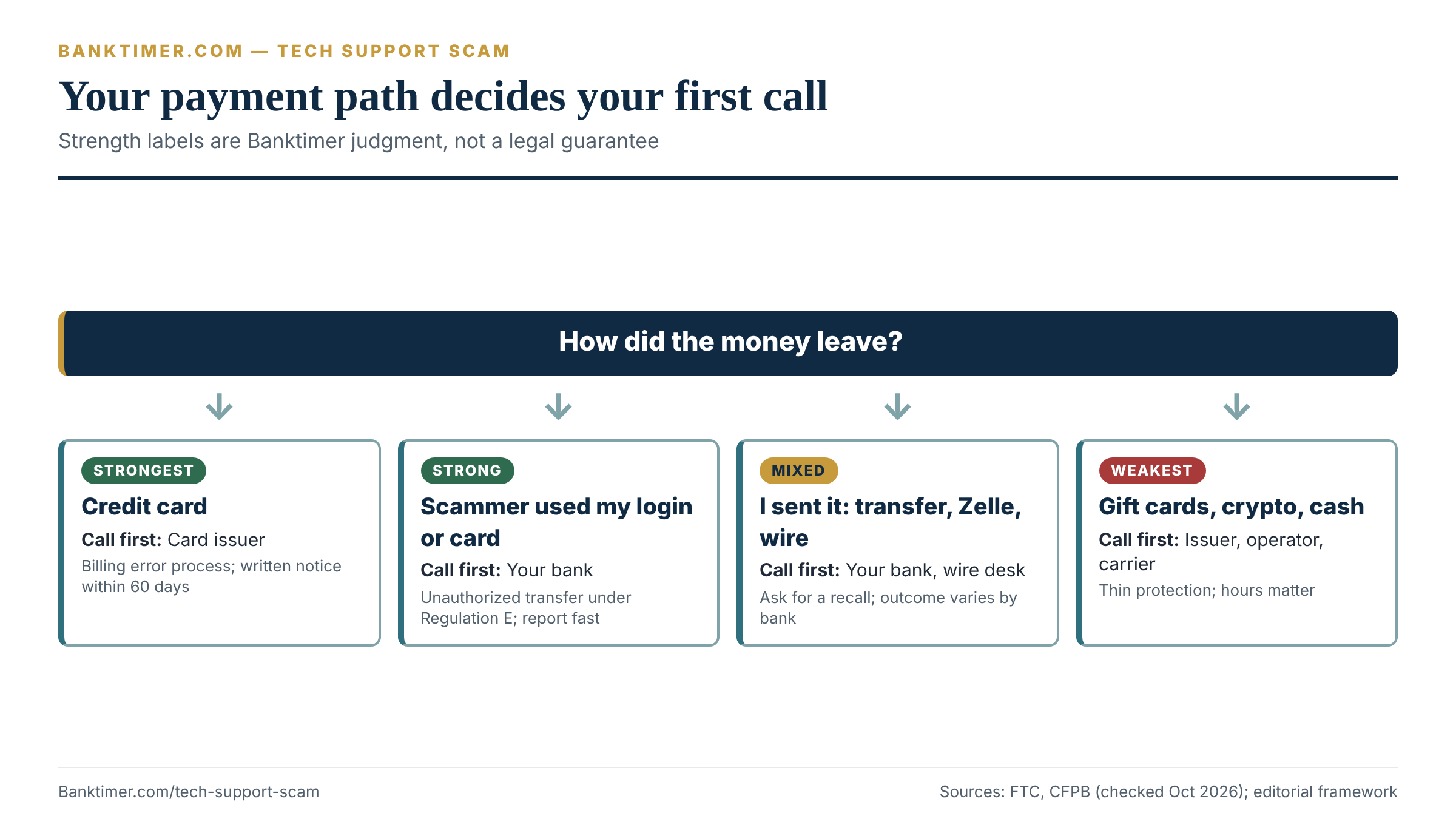
This question decides which rules protect you. Sort your case into one of four paths:
- Credit card. Use the billing error process. Call the issuer, then follow up in writing within 60 days of the statement.
- Scammer used your card or login. This is likely an unauthorized transfer. Say so in the first sentence of your call.
- You sent it yourself by bank transfer, Zelle, a payment app or a wire. Report immediately, ask for a recall or reversal, and expect a harder conversation.
- Gift cards, crypto or cash. Call the issuer, operator or carrier at once. Protection is thinnest here, so speed is everything.
Question 3: What did they see?
If they saw only your desktop, clean the device and change passwords. If they saw your bank or card sites, treat those accounts as compromised and ask for new credentials and card numbers. If they got your Social Security number or ID, add the identity theft steps: report at IdentityTheft.gov and consider a credit freeze.
Putting the framework to work
Imagine a reader who clicked a pop-up, called the number, and let the caller connect. The caller asked her to log in to her bank “to confirm the refund.” Two days later, her bank flags a $2,300 transfer she did not make.
Walk through the questions. Is anyone still connected? She disconnects and uses her phone. How did the money leave? The scammer used her login, so path 2. What did they see? Her bank, so she asks for new credentials and a lock on online access. This is an illustrative case, not a real person. The point is that three answers, not the full story, set the plan.
Edge Cases and Exceptions
Real situations rarely match one tech support scam script. These cases come up often enough to deserve their own notes.
You called a real-looking support company that overcharged you
Not every bad support experience is the same as a scam. If you called a company because of an ad or a pop-up and paid for a service that was oversold, a card dispute may still apply. The FTC amended its Telemarketing Sales Rule in November 2024 to cover inbound calls for technical support services. The FTC’s guidance says the rule now reaches calls that consumers place in response to ads, direct mail or a pop-up or banner offering tech support.
The rule also bars sellers and telemarketers from accepting certain payment types. Under 16 CFR 310.4(a)(9) and (10), a seller or telemarketer cannot accept a remotely created payment order, a cash-to-cash money transfer or a cash reload mechanism as payment for goods or services sold through telemarketing. So a “tech support” seller who asks for one of those is breaking the rule. Treat the request as a warning sign and report it.
The account is a business account
Regulation E is a consumer rule. A small business’s checking account usually falls under the account agreement and other law instead. We did not review those rules, and the protections may be much thinner. If a business account is involved, call the bank at once, ask what the agreement says about fraudulent transfers, and consider talking to a lawyer.
The remote access was on a phone or tablet
The FTC’s guidance covers phones as well as computers. Update your security software, run a scan, delete anything it flags, change passwords and turn on two-factor authentication. For malware help, it suggests the device maker, a trusted company or a knowledgeable friend or family member. Remove any remote-support app you did not install on purpose.
Someone else was scammed and you are helping
When a parent or relative is the target, the conversation matters as much as the checklist. Avoid blame. Scammers are professionals, and losses in this category reach into the tens of thousands of dollars on average. Sit with the person while they call the bank. If you are not on the account, the bank may need the account holder to authorize the call, so ask what it can discuss with you.
Older adults can also call the National Elder Fraud Hotline at 1-833-372-8311 for help, per the Department of Justice.
The calls keep coming
Expect more. The FTC explains that scammers trade lists with names, phone numbers, the type of scam and how much you paid. Do not engage, and do not answer unknown numbers for a while. Write down who calls and what they say. If the new caller offers to recover your loss, you are on a list.
Money or a check really did show up
Sometimes a deposit or check does arrive. The FTC calls a “refund” check for more than you lost, paired with a story that you should return the difference, a scam. The trap is the return payment, which is your own money leaving your account.
Our guide to money deposited by mistake explains what to do with an unexpected deposit. The short version: do not send money back to a stranger on request. Ask your bank how to handle the funds.
How to Avoid a Repeat
Preventing a tech support scam is mostly a handful of habits. None of them depends on spotting a clever script.
Habits that block the common versions
- Make every contact two-way on your terms. If someone calls, hang up and contact the company using a number from your card, statement or its real website.
- Type, do not click, for support. The FTC warns against software ads in search results and social media. Type the company’s address yourself or use a bookmark.
- Allow remote access only if you started it. Microsoft’s guidance is to allow a connection only if you contacted support yourself.
- Use trusted help for real problems. The FTC suggests software company support channels, an in-person computer store, or someone you trust.
- Slow down on urgency. A deadline of 24 hours is a tactic, not a fact.
- Ask a second person. The FTC recommends talking to a friend, family member or neighbor when you are unsure.
Turn on the safeguards your bank already offers
Most banks and card issuers can send an alert for every transaction or every new payee. Turn those on. Add a verbal password if your bank offers one. These steps are inexpensive and catch mistakes within minutes instead of weeks. They are no substitute for hanging up.
Our guides on the bank phishing text and the fake bank website show other doors scammers use to reach the same logins. The payment app scam guide covers what happens after money moves through apps. Seasonal fraud follows the same playbook, as in our guides to the political donation scam and Black Friday scams.
Questions to ask your bank or card issuer
- ☐ Has the bank classified this as an unauthorized transfer, an error, or an authorized payment, and can it put that in writing?
- ☐ What reference number should I use, and which department owns the claim?
- ☐ Is a provisional credit coming, and on what date?
- ☐ Can you send a recall request to the receiving bank for the wire or transfer?
- ☐ Should I get new account numbers, a new card, and new online banking credentials?
- ☐ Can you add alerts for every payment, new payee or password change?
- ☐ What documents do you need from me, and by what deadline?
- ☐ If the claim is denied, what documents did you rely on, and how do I appeal?
Questions to ask before anyone connects to your device
- ☐ Did I contact this company first, using a number I found myself?
- ☐ Can I verify the company on its real website or a trusted review source?
- ☐ Why does the fix need control of my screen, and could I describe the problem to a local shop instead?
- ☐ Am I being asked to open a bank, email or payment site during the session?
- ☐ Is the person pushing a deadline or telling me to keep this private?
Frequently Asked Questions
What should I do if I gave a scammer remote access?
Disconnect the device from the internet right away, then call your bank and card issuers from a different phone. Tell them you were tricked into giving a stranger remote access and ask them to lock online access. Next, change passwords from a clean device, scan or reset the infected one, and report the tech support scam to the FTC at ReportFraud.ftc.gov and to the FBI at ic3.gov. Do not log in to financial accounts on the affected device.
Is Microsoft really calling me about a problem with my computer?
No. Microsoft says it does not send unsolicited email or make unsolicited phone calls to offer computer repair, and that its error and warning messages never include a phone number. If someone claiming to be Microsoft Support calls out of the blue, hang up. If you worry about your device, start the contact yourself through Microsoft’s official support pages, and report the call at microsoft.com/reportascam.
Can I get my money back after a tech support scam?
Sometimes, and it depends mostly on how you paid and how fast you reported. Credit card disputes and unauthorized-transfer claims carry legal rights and deadlines. Wires, gift cards and crypto are far harder. Report to your bank or the payment company immediately and ask for a reversal. No one can promise a result, so be wary of anyone who does, especially if they ask for a fee.
Does my bank have to refund me if I gave the scammer my login?
Often yes, if the scammer made the transfers. The CFPB says that when a consumer is tricked into sharing login details or codes, a resulting transfer is an unauthorized electronic fund transfer under Regulation E. You must report on time, generally within 60 days of the statement. If you sent the money yourself, the answer is less certain and varies by bank, so ask for a written decision.
How does a tech support scam reach my bank account?
Usually through your screen, your credentials or your own payment. The caller asks you to open your bank during a remote session, watches what you type, or has you read out a one-time code. Some callers then pose as the bank and tell you to move money to a “safe account.” Remote access alone does not empty an account. The logins and approvals do.
What if I paid with gift cards or crypto?
Contact the gift card company or the crypto exchange or ATM operator immediately. Tell them a scammer tricked you and ask for a refund. The FTC says to keep the gift card and receipt, and that crypto payments have fewer legal protections. Recovery is difficult, but a fast report to the issuer or operator is the only route. Also report to the FTC and IC3.
Do I need to reset my computer?
Not always, but consider it. Microsoft advises that if you gave scammers access, you should consider resetting the device, uninstall anything they had you install, run a full scan and install all updates. If you cannot tell what they changed, a reset is the cleaner option. Save photos and key files first, and photograph evidence of the scam before you wipe anything.
How do I close a fake virus pop-up?
Do not click inside it, and do not call the number. Quit the browser instead: on Windows, open Task Manager and end it; on a Mac, use Force Quit. When you reopen the browser, choose not to restore the previous session. Then run a security scan. The FTC says real security pop-ups never ask you to call a phone number, so any alert that does is fake.
Where do I report a tech support scam to the FBI and FTC?
Report to the FTC at ReportFraud.ftc.gov and to the FBI’s Internet Crime Complaint Center at ic3.gov. In the IC3 report, include the name of the person or company that contacted you, how they reached you, and the account numbers and names that received your money. You can also report to your state attorney general and local police. A report does not guarantee a refund, but it supports enforcement.
Why do scammers keep contacting me after I was scammed?
Scammers buy and trade lists of past victims, according to the FTC. The lists can include your name, phone number, the type of scam and how much you paid. Some of the new callers claim they can recover your money for an upfront fee. Do not pay, and do not give them bank details. Hang up, block the number, and report the call.
Should I freeze my credit after a tech support scam?
Consider it if the scammer saw your Social Security number, ID images or other personal data. The FTC says a credit freeze is free to place and lift, and it blocks new credit in your name until you lift it. If you gave your Social Security number, also report at IdentityTheft.gov for a personalized recovery plan. A freeze does not stop charges on existing accounts.
Pick up a phone the scammer has never touched, turn off the affected device’s internet connection, and call the number on the back of your card. Say you were tricked into giving remote access, and ask for a reference number before you hang up.
One thing decides how much of your money you can protect: how it left your account, and how fast you told the company that holds it. A credit card charge or a transfer the scammer made with your stolen login has legal protections and deadlines, so report by phone now and put it in writing within 60 days of the statement. A payment you sent yourself by wire, gift card or crypto has far fewer protections, so the first hours matter most. Clean the device, change passwords from a clean one, freeze your credit if your personal data was exposed, and report to the FTC and IC3. Be wary of anyone who offers to recover the money for a fee. This guide cannot predict your bank’s decision, covers consumer accounts rather than business ones, and does not review every state law.
Methodology
We checked each federal and company source listed below on October 15, 2026. We relied on FTC consumer guidance, the FBI’s 2025 IC3 annual report and 2023 public service announcement, CFPB pages on Regulation E, Regulation Z and error resolution, and Microsoft’s own support pages. The FBI loss figures come from IC3’s 2025 report; where the report’s tables differ slightly (for example, the 60 and older totals), we rounded and used the crime-type table.
The dollar examples, including the $299 charge, the $2,990 “refund,” the $6,500 takeover and the $42,000 wire sequence, are Banktimer illustrations. They are not real cases or live quotes. Averages per complaint and percentage shares are our own calculations from IC3 totals, saved in a script and rechecked.
Rules vary by payment type, bank, card issuer, state and account agreement. We did not test any service, call any company or contact any scammer. We did not review state laws, business-account rules or individual bank agreements. The IC3 and FTC datasets measure different things and rely on voluntary reports.
Sources
- How to spot, avoid, and report tech support scams, Federal Trade Commission (checked October 15, 2026)
- What to do if you were scammed, Federal Trade Commission (checked October 15, 2026)
- Refund and recovery scams, Federal Trade Commission (checked October 15, 2026)
- How to recognize, remove, and avoid malware, Federal Trade Commission (checked October 15, 2026)
- Credit freezes and fraud alerts, Federal Trade Commission (checked October 15, 2026)
- FTC takes aim at top fraud driving losses among older Americans, Federal Trade Commission, November 27, 2024
- Internet Crime Report 2025, FBI Internet Crime Complaint Center (checked October 15, 2026)
- “Phantom Hacker” scams target senior citizens, FBI IC3 public service announcement, September 29, 2023
- Electronic fund transfers FAQs, Consumer Financial Protection Bureau (checked October 15, 2026)
- 12 CFR 1005.11, Procedures for resolving errors, Consumer Financial Protection Bureau (checked October 15, 2026)
- How do I get my money back after an unauthorized transaction, Consumer Financial Protection Bureau (checked October 15, 2026)
- 12 CFR 1026.13, Billing error resolution, Consumer Financial Protection Bureau (checked October 15, 2026)
- Protect yourself from tech support scams, Microsoft Support (checked October 15, 2026)
- Use Quick Assist to help users, Microsoft Learn (checked October 15, 2026)
By the Banktimer Editorial Team · Published
Banktimer is an independent U.S. consumer-finance publication. Our editors draw on primary and official sources first, such as the CFPB, FDIC, Federal Reserve, and FTC, along with statutes, regulations, and providers’ own agreements and fee schedules. Then we add worked examples and decision tools. Our goal is the most useful, best-supported explanation the sources available to us at the time of writing allow.
This article is general information, not legal, tax, investment, insurance, or financial advice, and reading it does not create a professional relationship with Banktimer. Rates, fees, limits, and rules change, and they vary by state, provider, and contract, so confirm current terms with your bank, lender, insurer, or the agency named in the article before you act. Examples are illustrative unless labeled otherwise. Banktimer is not a bank, lender, insurer, or financial advisor, and we are not responsible for decisions or losses that result from relying on this content. For advice about your own situation, talk to a licensed professional.