To tell whether a fake bank website is in front of you, ignore how the page looks. Check how you got there and what the web address says. A real bank signs you in at a domain it owns, so read the address right to left up to the first single slash. Safest path: use a bookmark you created yourself, or type the address from your card or statement. Never use a link in a text, email or search ad.
If you already signed in, use the real bank’s phone number from your card, change your password from a clean device, and report the theft in writing. The clock matters most: Regulation E’s best protection starts when you report within two business days.
The address decides, not the design. Criminals copy logos and layouts in minutes. They cannot register your bank’s real domain, so the registered domain is the one check that holds up.
Search ads are a real route. The FBI warned in 2022 and again in November 2025 that scammers buy ads that imitate legitimate ones, so phishing pages appear near the top of results.
Your best habit is a bookmark. The FBI recommends reaching login pages through bookmarks or favorites, not through search results or ads.
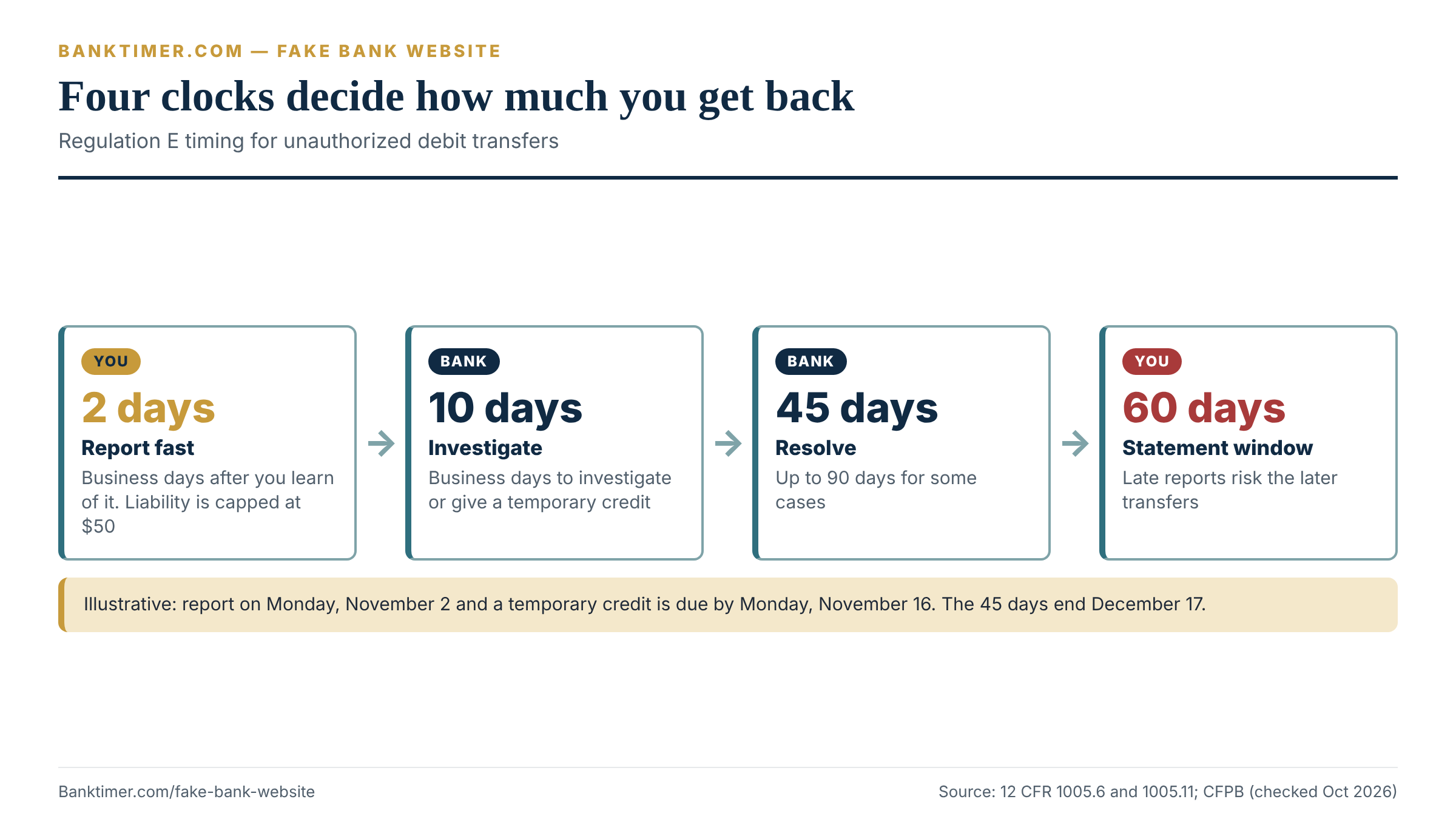
Speed protects your money. Under Regulation E, your liability can be capped at $50 if you report within two business days of learning of the problem. After that, it can reach $500.
Typing a password is recoverable. Most of the damage comes from delay, reused passwords and an email account the thief now controls, not from the single mistake.
Some payments cannot be pulled back. If a fake bank website talks you into sending money yourself, different and weaker rules apply, so call the bank before anything else.
What a Fake Bank Website Is and How It Takes Your Login
A fake bank website is a page built to look like your bank’s sign-in screen so you will hand over your credentials. The Consumer Financial Protection Bureau (CFPB) describes phishing as a scammer impersonating a business to trick you into giving out personal information, using fraudulent emails, texts or websites. The page is the trap. Everything that leads you there is bait.
The FBI’s Internet Crime Complaint Center (IC3) describes the outcome plainly. Scammers build sites that look like a real financial institution’s login page, and the credentials victims enter go straight to the criminals. In its November 25, 2025 alert, IC3 said it had received more than 5,100 account takeover complaints since January 2025. Reported losses topped $262 million.
That figure covers more than fake bank pages, because the alert also includes payroll and other impersonation. Still, it shows the scale of the problem: this is not a rare trick.
What the page does after you type
Many phishing pages do more than store what you type. A common design shows a short “verifying” screen while the operator tries your details on the real bank’s site. If the real site asks for a one-time code, the fake bank website asks you for one too, and you type it in. The operator then enters it within seconds.
We cannot see inside any particular scam kit, so treat this as how these pages commonly work, not a rule. The practical point stands either way. A code that you type into a page is only as safe as the page. That is why the address check matters more than any code your bank sends.
Some pages end by redirecting you to the genuine site, so you assume a glitch and move on. Others show an error and ask you to try again. Neither outcome tells you that the first page was fake.
Five ways you end up on the page
You rarely type the fake address yourself. Something sends you there. The route tells you how much to trust the page, because each route has a different weak point.
| Route | What it looks like | Your best defense |
|---|---|---|
| Text or email link | “Suspicious activity, verify now” with a button | Do not tap. Open your bookmark or the app instead |
| Search ad | A sponsored result above the real ones for your bank’s name | Skip anything marked sponsored. Use a bookmark |
| Search result (organic) | A page that ranks for “bank login” or your bank’s name | Check the address. Prefer a bookmark |
| Typing error | A mistyped address lands on a lookalike | Type slowly, or use a bookmark you saved from your statement |
| QR code or social ad | A code on a flyer or an ad promising a bonus | Do not sign in through it. Go to the bank directly |
The first row is covered in detail in our guide to the bank phishing text. The second row gets its own section below, because it surprises people the most. If a caller walked you to the page, our bank impersonation scam guide covers that side.
This article focuses on the fake bank website itself. It shows how to recognize one, how to avoid ever needing to judge one, and what to do when you already did.
Lookalike Domains: Read the Address Before You Read the Page
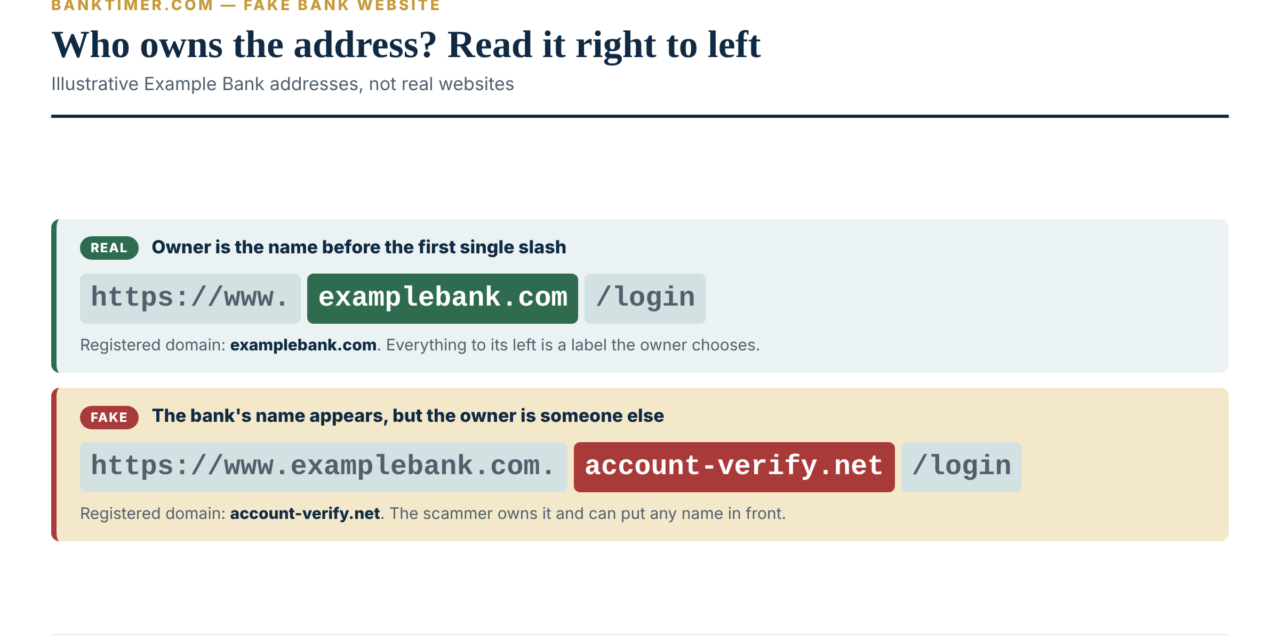
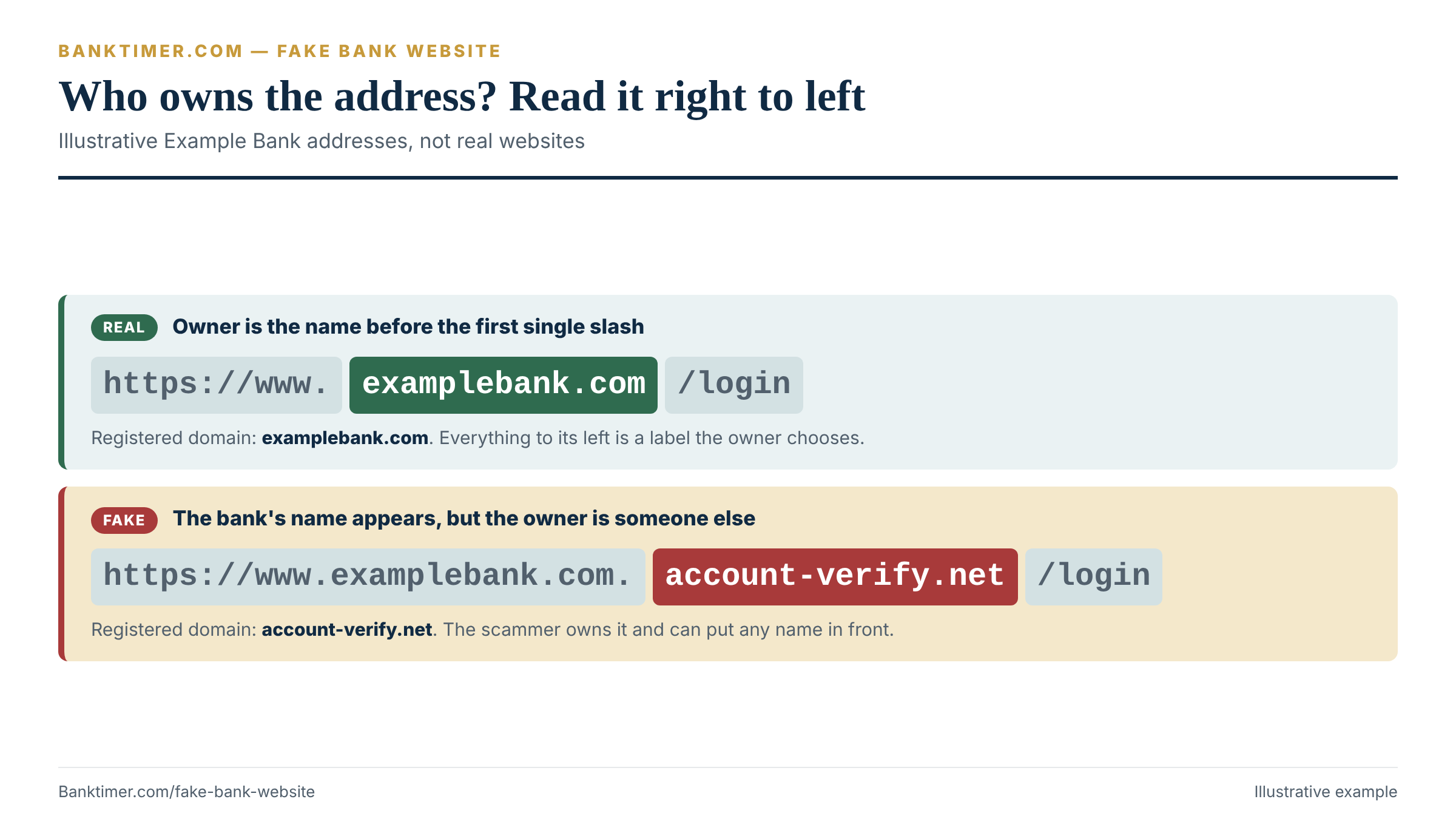
A web address is built from parts, and scammers exploit the fact that most people read it left to right. The part that identifies the owner sits near the end of the host name, just before the first single slash. Everything to its left can be chosen by whoever controls the domain.
Take an illustrative bank called Example Bank. Its real login page might live at https://www.examplebank.com/login. Break that into pieces:
- https:// says the connection is encrypted. It says nothing about who owns the page.
- www is a subdomain, a label the owner can set to anything.
- examplebank.com is the registered domain. This is the owner’s name. It is the part to check.
- /login is a path. Anyone can create any path.
Now compare it with https://www.examplebank.com.account-verify.net/login. The words “examplebank.com” appear, but the registered domain is account-verify.net. The scammer owns that domain and can put any subdomain in front of it.
The lookalike tricks, side by side
Anyone building a fake bank website does not need your bank’s real domain. They need one that survives a quick glance on a small phone screen. The patterns below are illustrative, using the fictional Example Bank.
| Trick | Illustrative fake address | Why it works | How to catch it |
|---|---|---|---|
| Real name as a subdomain | examplebank.com.secure-login.net | The bank’s name appears first | Find the last name before the first single slash |
| Extra words | examplebank-secure.com | “Secure” feels reassuring | Compare the whole domain with your card, not just the name |
| Swapped or doubled letters | examp1ebank.com, exarnplebank.com | The eye fills in the right letters | Zoom in. Compare character by character |
| Different ending | examplebank.co or examplebank.help | The brand is right, the ending is wrong | Confirm the exact ending from your card or statement |
| Credentials trick | [email protected] | Text before an @ sign can be read as a login name, not the host | Distrust any @ sign in an address |
| Foreign look-alike letters | Characters that resemble Latin letters | Some alphabets share near-identical shapes | Use a bookmark so you never judge the letters |
The insight in the table: five of the six tricks fail instantly if you did not arrive by clicking. A bookmark or a typed address never passes through any of them. Reading addresses is a backup skill. Bookmarks are the primary defense.
The padlock proves less than you think
A padlock or “https” means your connection to the page is encrypted. It does not mean the page belongs to your bank. Anyone who registers a domain can usually get an encrypted connection for it. A criminal’s lookalike page can show the same padlock as the real one.
So do not use the padlock to judge whether you face a fake bank website. Use it as a minimum. A real bank page should have it, but having it proves nothing. CISA lists incorrect email addresses or links, such as amazan.com, among its signs of phishing. The same logic applies to bank addresses.
What a .bank address does and does not tell you
Some banks use the .bank ending. The registry that runs it, fTLD, says the extension is meant to shield against cyberattacks and fraud. Its security requirements aim to mitigate threats such as phishing, spoofing and cybersquatting. See the fTLD Registry for details.
That is a useful signal when you see it, but its absence is not a red flag. Most banks and credit unions use .com, .org or other endings. Do not decide a page is fake just because it is not on .bank. Do not decide it is real just because it is.
Fake Bank Site in Search Ads: Why the Top Result Is Not a Safe Shortcut
Most people reach their bank the same way: they type the bank’s name into a search box and click the first thing they see. That habit is exactly what scammers pay to exploit. A search ad is a paid placement, so being at the top of the results says only that someone paid for the spot.
The FBI described how a fake bank website reaches you through ads in a public service announcement dated December 21, 2022 (alert I-122122-PSA). Criminals buy search ads that use a domain similar to a real business. The ads appear at the top of results, with little to distinguish them from genuine listings. They link to pages that look identical to the official site. The FBI said some of these schemes target cryptocurrency exchanges, where fake sites prompt users for login credentials and financial information.
The 2025 alert named it “SEO poisoning”
The November 2025 IC3 alert on account takeover fraud repeated the warning for financial institutions. It said scammers buy search ads that imitate legitimate business ads so their phishing sites appear near the top of search results and seem authentic. It also gave a filing tip: use the words “Account Takeover” or “SEO poisoning” in your IC3 complaint description.
The advice in both alerts is consistent, whether the imitation is of a bank or an exchange. The 2022 version tells you to check the URL before clicking an ad. It also says to type the business’s address directly into the browser instead of searching. The 2025 version tells you to reach login sites through bookmarks or favorites, not through search results or ads.
A recent example from a different industry
The Federal Trade Commission (FTC) posted a consumer alert on August 17, 2026 about a related problem, paid ads for bill-payment pages. In FTC v. Doxo, Inc., the FTC alleges that the company posed as an official payment channel for companies and agencies. Those are allegations, not findings. The FTC’s advice is useful regardless of how that case ends. Scroll past the paid search results, and type the company’s website address directly into your browser.
The case is about bill payment, not banking, but the mechanics are the same. A paid ad can make a different company look like the one you wanted.
How to tell an ad from a result
Search engines label paid results, usually with a word such as “Sponsored” near the link. Labels change over time and differ by device, so we do not rely on a single description of what they look like. The safer rule is simpler. If your bank’s name is in the query, treat everything at the top as suspect until you have checked the address.
An ad-blocking extension can help. The FBI’s 2022 alert lists one among its tips, noting it can be turned on or off per website. Blocking ads reduces the chance of a mistaken click. It does not replace a bookmark.
Five Ways to Reach Your Bank, Compared
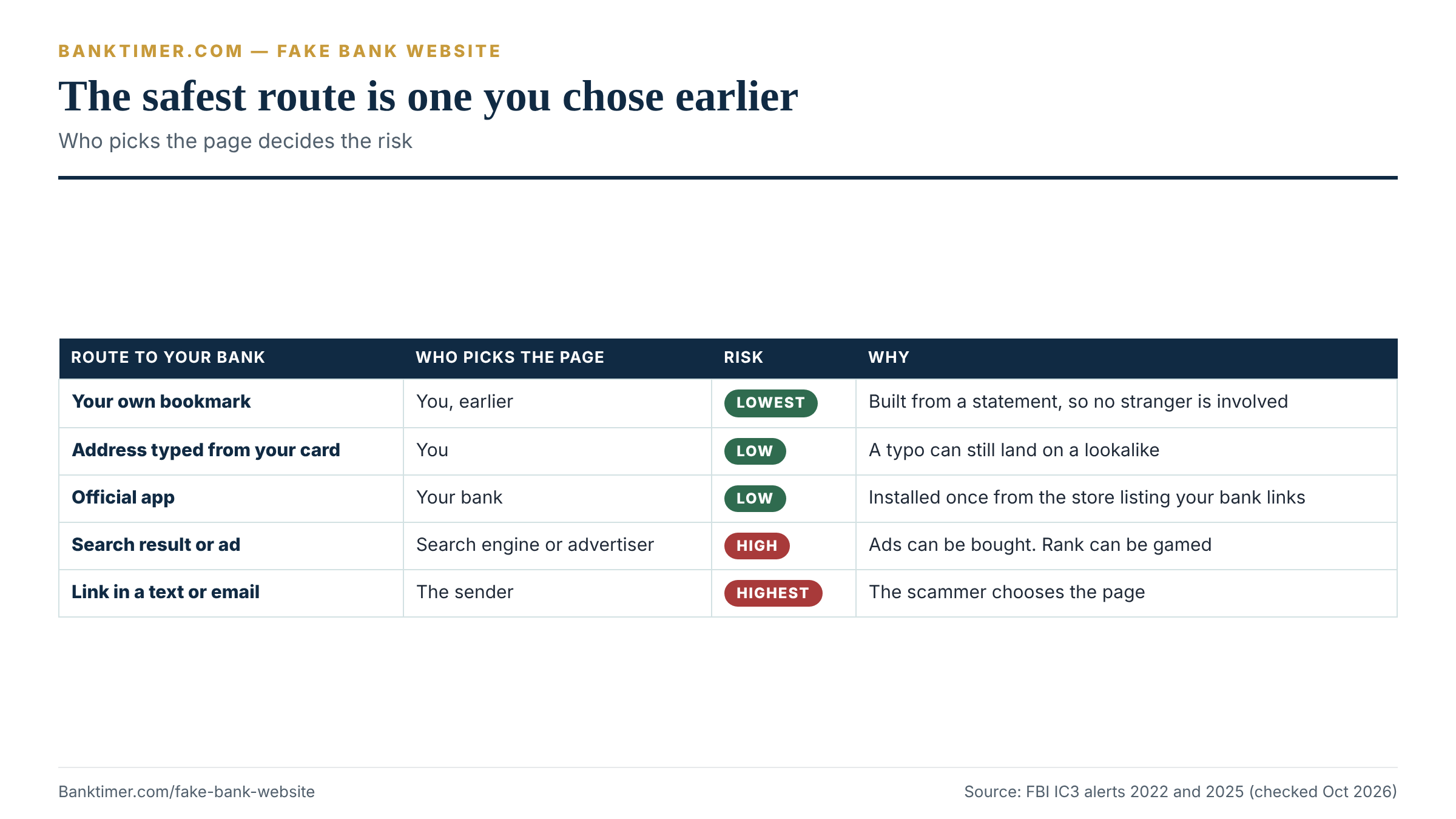
Every way of getting to your bank’s sign-in page has a failure mode. The question is which failure you can live with. The table below compares them on the same criteria so you can choose one default and stick to it.
| Route | Exposure to lookalike pages | Setup effort | What can go wrong | Best use |
|---|---|---|---|---|
| Bookmark you made yourself | Very low, if the original was correct | A few minutes, once | A bookmark saved from a fake page stays fake | Daily sign-in on a computer |
| Address typed from your card or statement | Low | Small each time | A typing error can land on a lookalike | When you have no bookmark yet |
| Official mobile app | Low, if installed from the store listing your bank links | A few minutes, once | A lookalike app or an outdated install | Daily sign-in on a phone |
| Search result or ad | High | None | Paid ads and SEO poisoning | Avoid for sign-in |
| Link in a text, email or message | Highest | None | The link is chosen by the sender | Never for sign-in |
Notice what the bottom two rows have in common. Someone else chooses where you land. In the top rows, you choose, and you chose it when you were calm.
How to set up a bookmark you can trust
A bookmark is only as safe as the moment you made it. If you create it while looking at a fake bank website, you have saved the fake. So build it from a source you already trust.
- Find the web address on a paper statement, the back of your card, your account agreement or a letter from the bank.
- Type it yourself into the address bar. Do not copy it from a search result.
- Compare the registered domain with what you read on the statement.
- Save it with a plain name such as “My bank”. Put it on your phone’s home screen too, if your phone allows.
- Stop searching for your bank’s name. Use the bookmark every time.
After a merger, rebrand or system conversion, your bank may change its sign-in address. Do not fix a broken bookmark by searching. Call the number on your card and ask for the current address, or read the notice the bank mailed you.
If your own bookmark lands somewhere strange
A bookmark that suddenly opens a different-looking page is unusual. Do not sign in. The FTC’s advice for a device that may be compromised is simple. Update your security software, run a scan and delete anything it identifies. Then call the bank from the number on your card and describe what you saw.
This is a case where a clean device matters. If you suspect the computer, use your phone on mobile data, or a device you trust, to check your accounts.
How to Verify a Bank Website Is Real in Two Minutes
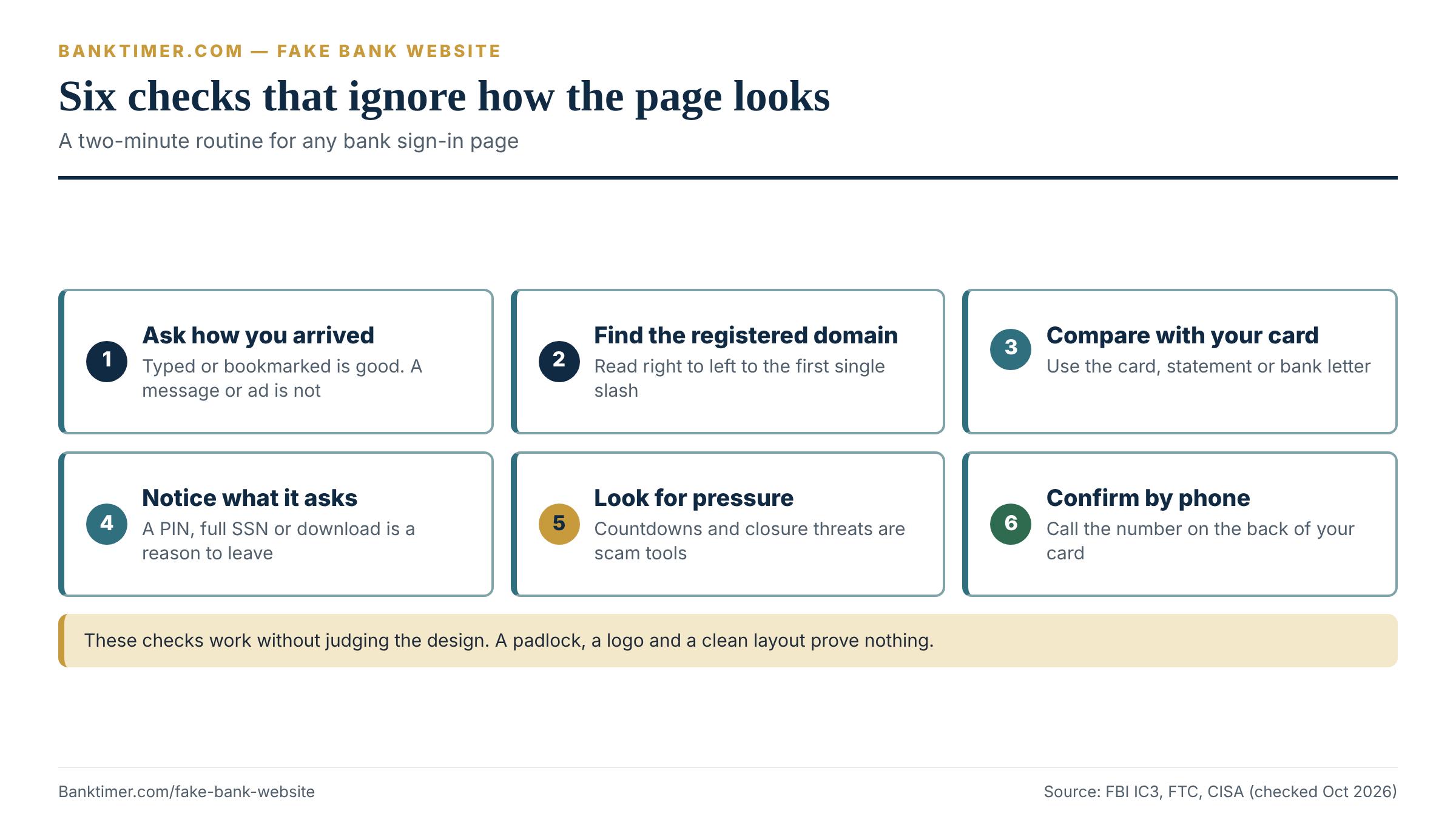
You will sometimes land on a page without a bookmark, such as on a new computer, a travel laptop or a relative’s tablet. Then you need to know whether it is a fake bank website or the real thing. You need a short routine that does not depend on judging the design. This one works from the outside in.
- Ask how you arrived. Did you type the address or use your own bookmark? If a message, ad or caller sent you, stop.
- Find the registered domain. Read the address right to left up to the first single slash. Identify the last name before the ending.
- Compare it with a trusted source. Check it against your card, a paper statement or the bank’s letter. Not a search result, not a message.
- Notice what the page asks for. A sign-in page needs your credentials. Treat a request for a card PIN, a full Social Security number, or a “verification” download as a reason to leave.
- Look for pressure. A countdown, a “your account will close” banner or a phone number to call is a scam’s sales pitch. A bank’s login screen does not need one.
- Confirm by phone if still unsure. Call the number on the back of your card and ask whether the address is theirs.
Confirm with an independent lookup
The FDIC runs a public lookup called BankFind Suite where you can search for an institution by name. Checking that the bank exists, and comparing any website it lists with the one you are using, is a quick independent test. Look it up at FDIC BankFind. A page that claims to be a bank you cannot find there deserves a phone call, not a password. Credit unions are insured by a different agency and will not appear in FDIC tools. For a credit union, rely on your card, statement and phone call.
What the page shows versus what it proves
Some signals feel reassuring and prove nothing. The table separates what you can see from what it actually tells you.
| What you see | Does it prove the bank owns the page? | What to do instead |
|---|---|---|
| Padlock or “https” | No. It shows an encrypted connection to whoever runs the page | Check the registered domain |
| Perfect logo and layout | No. Copying a design is easy | Check how you arrived |
| No typos or grammar errors | No. CISA notes AI can now produce polished messages | Ignore polish; check the source |
| A phone number or chat window | No. The number may belong to the scammer | Use the number on your card |
| “Verified” or “secure” badge | No. A badge is just an image | Treat it as decoration |
| Your password manager fills the form | Strong sign, not proof | See the next section |
| Your bank’s name in the address | Not by itself | Find the registered domain |
The insight: every visual check can be faked by someone with an hour of free time. The only cheap check a scammer cannot fake is which domain they own.
Let your password manager act as an alarm
Many password managers save a login together with the web address where you created it. When you later visit a page, they offer to fill in your details only on a matching address. If your manager stays blank on a page that claims to be your bank, treat the silence as a warning. Behavior varies by product and settings, so do not assume yours works this way. Do not type the password by hand to get around it.
Password managers also help in a second way. They make it easy to use a different password for each account. That limits the damage if one site, real or fake, ever gets a copy.
Checks that do not need technical skill
You do not need to be a security professional to use this. You need three habits. First, never sign in from a link someone sent you. Second, keep one bookmark. Third, if a page ever asks for more than it normally does, close it and call. Everything else in this guide is a backup for those three.
For a broader view of what sign-in screens ask for, see our guides to banking basics and the checking account.
I Entered My Password on a Fake Bank Website: What to Do in the First Hour
Start with the good news. Typing a password into a fake bank website does not mean your money is gone. It means a stranger may hold a copy of your sign-in details, and the next hour decides whether they get to use it. Move in a calm order. Do not panic-click.
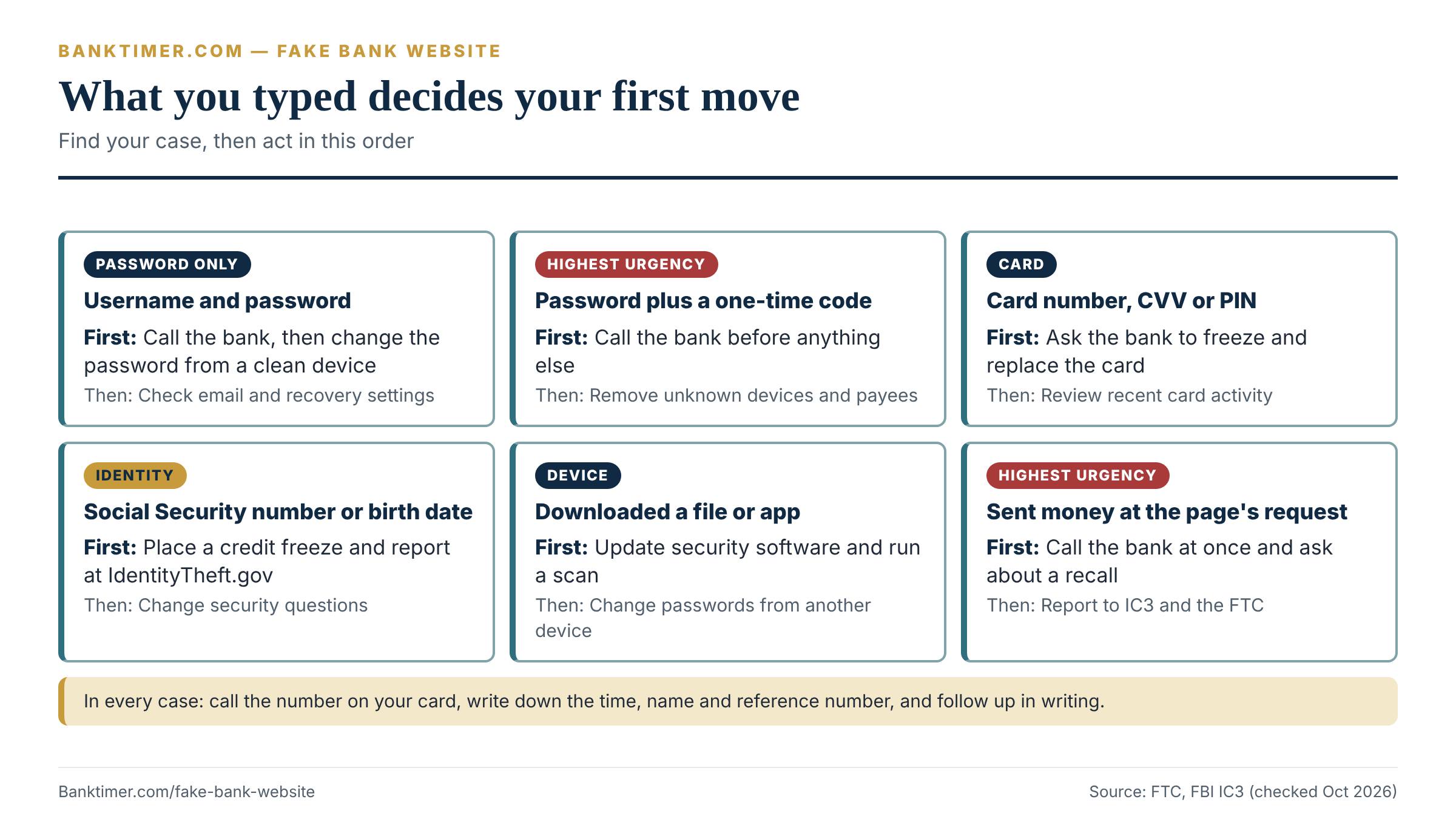
The right steps depend on what you typed. A password alone is a smaller problem than a password plus a one-time code, and both are smaller than a card number with its PIN. Use the table to find your row, then follow the steps below it.
| What you entered | Main risk | Do now | Then |
|---|---|---|---|
| Username and password only | Sign-in to your account | Call the bank, change the password from a clean device | Check email and recovery settings |
| Password plus a one-time code | Immediate sign-in, possibly with new devices added | Call the bank first, before anything else | Ask them to remove unknown devices and payees |
| Card number, expiration date, CVV or PIN | Card-not-present purchases, ATM use | Ask the bank to freeze and replace the card | Review recent card activity |
| Social Security number, date of birth, security answers | New accounts and identity theft | Place a credit freeze, report at IdentityTheft.gov | Change security questions where you can |
| A file or app you downloaded | Malware on your device | Update security software and run a scan | Change passwords from another device |
| Money you sent at the page’s request | A payment you authorized | Call the bank immediately and ask about a recall | See the rights section below |
The insight in the table: the order of calls changes. With a one-time code, the thief may already be in, so the bank call comes before the password change. With only a password, changing it from a clean device is fast and also fine.
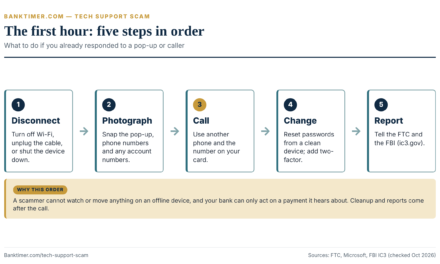
Step 1: Stop, close the page and do not try again
Close the tab. Do not retype your password “to see if it works.” If the page shows an error, do not click anything else on it. Do not call any number the page displayed.
If you clicked a link in a text or email to get there, leave the message alone for now. You will want to keep it as evidence, and our guide to the bank phishing text explains how to save it safely.
Step 2: Call the real bank from the number on your card
Use the number on the back of your debit or credit card, or on a paper statement. Do not use a number from the page, a text or a search result. The FBI’s guidance after an account takeover starts here. Contact your financial institution, report the fraud right away and request a recall or reversal if money moved.
Say plainly what happened. “I entered my sign-in details on a fake bank website. I want to protect my account.” Then ask for specific actions:
- Lock or restrict online access until you can reset your credentials
- Review sign-ins, new devices, new payees and changes to your phone number, email or address
- Cancel any pending transfers and ask about recalling anything that has already left
- Add a note to your file with the date and time you entered the details
- Give you a case or reference number, and tell you what they need in writing
If the person asks whether you “authorized” anything, answer truthfully. You did not authorize a transfer; you entered details on a page you believed was your bank’s.
Keep the call short and the answers factual. Write down the name of the representative, the time and the reference number. We cover the reporting clock in the rights section.
Step 3: Change the password from a device you trust
The FTC says that if you can still log in, you should change the password for the compromised account. Do the same for any other account where you reused it. It also says to turn on two-factor authentication. Do this from a device you trust. If you suspect the one you used to visit the fake page, use a different one.
Make the new password unique and long. Do not reuse your old one with a number added. Scammers who capture a password try small variations on other sites.
Set a priority order if you reused the same password in several places. Start with your email, because email resets everything else. Then your bank and other financial accounts, then your phone carrier, then everything else.
Step 4: Check the doors the thief may have opened
A thief with your email can read your messages and may hide their tracks. The FTC’s advice on a hacked email or social media account is specific. Log out of all devices. Confirm the recovery email and phone numbers are yours. Delete forwarding rules you did not create. It also says to review your sent and deleted folders for messages you did not write.
Do the same for your bank’s profile. Look at the phone number, email address, mailing address and alert settings. A thief who changes the alert contact details can keep you from hearing about the theft.
Check your phone carrier account too. If your number is the way a bank sends you codes, protect it with a carrier PIN or passcode if the carrier offers one. This is practical hygiene, not a verified step from any single agency.
Step 5: Scan the device if you downloaded anything
If the page asked you to install an app, open an attachment or “update” a plug-in, treat the device as compromised. The FTC says to update your security software, run a scan and delete anything it identifies as a problem. Then change your passwords and turn on two-factor authentication, ideally from a different device.
If you cannot remove the problem yourself, the FTC suggests the device manufacturer, a trusted company or a knowledgeable friend or family member.
Step 6: Put a freeze on credit if personal details were involved
If you entered a Social Security number, date of birth or other identity details, the bank is not your only concern. A credit freeze is free. According to the FTC, there is no cost to place or lift one. It stays until you lift it. You must contact all three bureaus: Equifax, Experian and TransUnion. A fraud alert is also free and lasts one year, and you only contact one bureau. Our guide to credit freeze vs. fraud alert explains how to choose.
If someone used your information, report at IdentityTheft.gov, the FTC’s site for reporting identity theft and getting a recovery plan. Our identity theft recovery guide covers the longer process.
Four things not to do
These are common, understandable and costly.
- Do not wait to see if anything happens. Waiting uses up the fastest part of the clock.
- Do not call back a number from a message or the page. A scammer may answer.
- Do not move money to a “safe account.” A request to do this is a standard scam step. Call the bank on your card number before you move anything.
- Do not delete the evidence. Keep the text, email, screenshots and browser history until the case closes.
A second caller who knows you just visited a page, and who offers to “fix” it, is a warning sign. Hang up. Call the number on your card yourself. Our bank impersonation scam guide shows how that follow-up works.
If you cannot log in anymore
If the password no longer works, someone may have changed it. Call the bank right away from the number on your card. The FTC advises following the provider’s recovery instructions when you cannot sign in, then securing the account once you are back in. Ask the bank to confirm which email and phone number are on file before it sends any reset link.
The account may still be yours to control. The bank can verify your identity another way, lock the account and issue new credentials. That is much faster than trying to recover a login yourself.
A short script for the first call
You can read this nearly word for word:
“My name is [name]. A few minutes ago I entered my online banking details on a web page I now believe was fake. Please restrict online access and check my account for any sign-ins, transfers, new payees or profile changes since [time]. I need a reference number, and I want to know what you need from me in writing.”
Then listen. If the representative says nothing has moved, ask to place an alert on the account anyway and ask for the next steps in writing.
Your Rights if Money Left Your Account After a Fake Bank Website
Whether you get money back after a fake bank website takes your login depends on how it left your account and when you spoke up. Several different rulebooks apply, and people often mix them. Separate them first. Then work out which one fits your case.
| How the money left | Main rulebook | Who sets the terms | What to know |
|---|---|---|---|
| Debit card or electronic transfer from a consumer account | Regulation E (federal) | Federal rule, plus your deposit agreement | Fixed liability tiers and investigation deadlines |
| Credit card charge | Regulation Z (federal) | Federal rule, plus your cardmember agreement | Liability for unauthorized use is capped at $50 |
| Wire transfer | Not Regulation E in most consumer cases | Bank agreement and other law | Ask for a recall immediately |
| A payment you sent yourself, such as through a payment app | Mostly bank and app policy | Bank, app and network terms | Outcomes vary widely |
| Business account | Your account agreement | Contract | Do not assume consumer protections apply |
The insight in the table: the same fake bank website can lead to four different legal outcomes. The first question to ask your bank is not “will you refund me?” but “which rule governs this transfer?”
Why a login you gave away can still be an unauthorized transfer
Regulation E defines an unauthorized electronic fund transfer as one initiated by a person other than the consumer, without actual authority, from which the consumer receives no benefit. The rule excludes some cases, such as a transfer by someone you gave your access device to, or one made with fraudulent intent by you. The text is at 12 CFR 1005.2.
The CFPB’s official commentary adds that an unauthorized transfer includes one initiated by a person who obtained the access device from the consumer through fraud or robbery. And the CFPB’s Electronic Fund Transfers FAQs, last updated January 15, 2025, answer the phishing question directly. When a consumer is fraudulently induced into sharing account access information, and a third party uses it to make a transfer, the transfer is an unauthorized transfer under Regulation E.
That matters because a bank cannot simply say “you gave them your password, so it is on you.” Keep in mind that this is an agency interpretation, and a bank may read the facts of your case differently. Our Regulation E guide goes deeper on the rule.
The liability tiers in plain numbers
Regulation E sets how much you can be held responsible for, and the amount depends on when you report. The CFPB’s page on getting your money back after an unauthorized transaction, reviewed August 28, 2026, summarizes the tiers.
| When you report | Your liability cap | Source detail |
|---|---|---|
| Within 2 business days of learning of the loss or theft of the access device | The lesser of $50 or the unauthorized transfers before notice | 12 CFR 1005.6(b)(1) |
| After 2 business days | Up to $500 | 12 CFR 1005.6(b)(2) |
| Transfers appear on a statement and you do not report within 60 days | The later transfers the bank can show it would have prevented | 12 CFR 1005.6(b)(3) |
| Extenuating circumstances, such as long travel or a hospital stay | Deadlines extended to a reasonable period | 12 CFR 1005.6(b)(4) |
| Your deposit agreement gives you better terms | The lower amount applies | 12 CFR 1005.6(b)(6) |
Two details deserve a close read. First, the regulation ties the $50 and $500 tiers to the loss or theft of an “access device.” Whether a phished login counts as a lost or stolen access device for the two-business-day tier is a question to ask your bank. Banks may answer differently. Report inside two business days regardless, so the question never matters.
Second, the 60-day rule has no dollar ceiling in the text for the later transfers. It limits liability to those the bank can show it would have stopped had you reported on time. That is a heavy bet to place on a delay.
Three worked examples with the numbers
These are illustrative. The dollar amounts are invented, and the outcomes follow the regulation’s tiers. Your bank’s agreement may be more generous (Regulation E allows lower liability by agreement), and your facts may differ.
| Scenario | What happened | Liability under the tiers | Likely refund |
|---|---|---|---|
| A: Fast report | $4,200 taken in three transfers. You call the bank the day you learn of it | $50 | Up to $4,150 |
| B: Slow report | Same $4,200. You report on the fourth business day. $1,900 left after the two-day window | $500 | Up to $3,700 |
| C: Missed the statement | A $2,500 transfer shows on a statement sent October 31. You report January 15. Two more $2,500 transfers happened January 5 and 12 | The later $5,000 may be yours if the bank shows timely notice would have prevented it | Varies |
The difference between A and B is $450 for waiting a few days. Scenario C is the expensive one. The 60 days from an October 31 statement end on December 30, and January 15 is 76 days after the statement. This is why checking your statements, not only your balance, belongs in the routine.
What the bank has to do after you report
Once you notify the bank of an error, Regulation E starts a set of deadlines. These come from 12 CFR 1005.11 and match the CFPB’s plain-language summary.
- The bank generally has 10 business days to investigate, or 20 if the account has been open under 30 days.
- If it cannot finish, it generally must give you a temporary credit for the disputed amount, less up to $50 in an unauthorized-transfer case, while the investigation continues.
- It can require written confirmation of a phone report. If you miss the 10-business-day follow-up, it does not have to issue the temporary credit.
- The investigation must generally finish within 45 days, or up to 90 days for point-of-sale debit purchases, transfers initiated outside a state, or accounts under 30 days old.
- It must tell you the results within 3 business days after finishing, and correct a confirmed error within 1 business day.
- If it finds the transfers were authorized, it must give you written notice before removing temporary credit.
The practical lesson: follow every phone report with a written one the same day. Use the bank’s secure message center or a letter, and keep a copy.
The cash-flow squeeze while you wait
Rules protect your balance in the long run. They do not pay your rent this week. Take a typical case. You had $6,500, and $4,200 was taken, leaving $2,300. You report on Monday, November 2. Ten business days later is Monday, November 16, and the temporary credit may not arrive until then.
If rent of $1,650 comes out first, the balance falls to $650. A $900 card payment and $240 of utilities would push the account to negative $490. Those figures are illustrative.
Three actions help. Ask the bank whether it can speed up the temporary credit, and whether it will waive overdraft fees on the disputed period. Tell your landlord and lenders you are disputing fraud and ask for a short extension. And see our overdraft fees guide before agreeing to any short-term borrowing.
When you sent the money yourself
Sometimes the fake bank website ends with a message: “To secure your account, send funds here.” Or a caller follows up and walks you through a transfer. If you made the payment, even under deception, the rules change. A payment you authorized does not fit the unauthorized-transfer definition, and the protections are thinner and more varied.
Call the bank immediately and ask about a recall. For wire transfers, the FBI’s account takeover guidance says to report fraudulent wires to both your bank and IC3, and to ask for a recall or reversal. Speed is the main factor, because a recall works best before the receiving bank moves the funds. Regulation E excludes some wire transfers from its coverage under 12 CFR 1005.3, so ask about the rule that applies.
Our guides to payment app scams, ACH transfer problems and bank account takeover cover the next steps for those payment types.
If the charge was on a credit card
Credit cards follow Regulation Z. Under 12 CFR 1026.12(b), a cardholder’s liability for unauthorized use generally cannot exceed the lesser of $50 or the amount obtained before the issuer was notified. That cap applies only if the issuer has met certain disclosure conditions. Report the charges to the issuer in writing and ask for a replacement card. Compare this with the debit tiers: a credit card keeps the bank’s money, not yours, at risk during a dispute.
If the bank says no or goes quiet
Ask for the findings in writing, and ask what evidence led to the conclusion. The CFPB says that you may request the information the bank used, and the bank must send it promptly. Reply in writing with your account of events and your evidence.
If the answer is still no, file a complaint with the CFPB at consumerfinance.gov/complaint or by calling (855) 411-2372. Also consider your state attorney general’s consumer office. Our debit card fraud guide lays out the escalation path in more detail.
Evidence to Save Before You Close Anything
Good records turn a complaint about a fake bank website into a case the bank can act on. Collect them while the memory is fresh, and keep them in one folder. Do not rely on your inbox or browser history alone, because both can change.
| Evidence | Why it matters | Where to get it | Keep it until |
|---|---|---|---|
| The message or ad that sent you | Shows how you were lured | The text, email or a screenshot of the search results | The case is closed |
| The web address you visited | Identifies the fake domain | Browser history, or a screenshot of the address bar | The case is closed |
| Screenshots of the page | Shows what you were asked for | Your device, if you still have the tab | The case is closed |
| Time and date you entered details | Anchors the reporting clock | Your own notes, plus browser history | The case is closed |
| Statements and transaction list | Proves what left the account | Your bank’s online banking or paper statements | The case is closed |
| Name, time and reference number of each call | Proves when you gave notice | Your call notes | The case is closed |
| Copies of written reports | Proves written notice | Secure message center or mailed copy | The case is closed |
| Reports filed with the FTC and IC3 | Shows you reported | Confirmation pages or emails | The case is closed |
The “keep it until” column is the same on every row for a reason. Do not throw away anything until the bank has finished its investigation and a later statement shows the right balance. If a dispute grows into a complaint or a lawsuit, you may need all of it.
One caution. Do not click the fake link again to get a better screenshot. Capture what you already have, and note the address from your browser history or the original message.
Where to Report a Fake Bank Website and What Each Report Does
Reporting a fake bank website serves three goals: getting your money back, protecting your identity, and helping others avoid the same page. Each agency does one of these, and none of them does all three.
| Report to | When | What it does | What it does not do |
|---|---|---|---|
| Your bank | First, always | Starts the dispute and the legal deadlines | Does not count for much without a written record of what you reported |
| FTC (ReportFraud.ftc.gov) | Always, even if you lost nothing | Adds to data used to fight scammers | Does not reverse a transaction |
| IdentityTheft.gov | If your personal details were exposed | Builds a recovery plan | Does not recover money by itself |
| FBI IC3 (ic3.gov) | If money moved | Records the crime for law enforcement | Does not work to recover lost funds for you |
| CFPB complaint | If your bank mishandles the dispute | Asks the bank for a response | Does not guarantee a refund |
| The impersonated bank | When you can | Lets it warn customers and ask for the page to be taken down | Does not replace your own dispute |
| APWG ([email protected]) | If the lure was an email | Sends the phishing email to the Anti-Phishing Working Group | Does not help with your own account |
The IC3 row is the one people misread. IC3’s own page says that it cannot respond to every submission, and that it does not work with non-law enforcement entities to recover lost funds. File anyway, because the report can connect cases. But do not wait for it. Your bank is the party that can reverse a transfer.
How to file with IC3
The FBI’s November 2025 alert asks for detail. Include the impersonated institution, the scammers’ names, phone numbers, addresses and email addresses, any websites or software you were directed to, and any financial accounts involved. Use the words “Account Takeover” or “SEO poisoning” in the description if they fit.
For a lure that arrived as a text, the FTC says to forward it to 7726 (SPAM). For email, forward to [email protected]. Both are quick and take a minute.
Tell the bank that was impersonated
The FBI recommends notifying the impersonated company about how the scammers reached you, so it can warn others and request takedown of the pages. Use the bank’s fraud contact from your card, not the contact details on the page. Give it the address of the fake page and the date.
Sign-In Methods Compared: What a Fake Page Can and Cannot Capture
Many banks now offer more than a password, which matters because a fake bank website can capture a password easily. These options are not equal against a fake page. The table sorts them by one question. Can someone running a fake page collect what you type or approve, and use it on the real site?
| Sign-in method | Can a fake page collect it? | Why | Practical note |
|---|---|---|---|
| Password only | Yes | You type it into the page | The weakest option |
| Code by text or email | Yes, if you type it into the page | A page can ask for the code and pass it along | Better than nothing; never read a code to a caller |
| Code from an authenticator app | Yes, if you type it into the page | Same relay problem | Harder to intercept than a text |
| Approval prompt on your phone | Possibly | You could approve a prompt that a thief triggered | Deny any prompt you did not start |
| Passkey or hardware security key | Designed not to | The FIDO Alliance describes passkeys as phishing resistant | Use it if your bank offers it |
The insight: any code that you can type into a page can, in principle, be passed along by whoever runs the page. A passkey is different, because FIDO describes passkeys as unique to each app, website or service. The FIDO Alliance states that “passkeys are phishing resistant and secure by design.”
The FBI’s advice is blunt about the basics. Use unique, complex passwords. Turn on two-factor or multi-factor authentication wherever possible, and never disable it. The FTC adds that multi-factor authentication makes it harder for scammers to log in even when they have your username and password. Both can be true at once. Multi-factor sign-in raises the bar, and the strongest versions are the ones a fake page cannot copy.
How to choose
Open your bank’s security settings and look at what it offers. Choose the strongest option available. If the bank offers a passkey, a security key or an authenticator app, prefer those over text codes. If it offers only text codes, turn them on and keep your phone number protected.
Then add the second layer around it: a password manager, unique passwords and account alerts. Our checking account guide covers alert settings and other account features.
Habits That Make a Fake Bank Website Harmless
The pattern in every defense in this guide is to remove the moment of judgment. You cannot misread an address you never read. These habits do that.
- Keep one bookmark per financial site. Build it from a statement, not a search.
- Use the bank’s app for mobile sign-in, installed once from the store listing your bank links to.
- Use a password manager and a different password for every account.
- Skip search for sign-in. Reserve search for questions, not for logging in.
- Turn on alerts for sign-ins, new payees and large transfers.
- Read your statements. The 60-day clock runs from the statement, not from your discovery.
- Keep devices updated. The FTC recommends security software and automatic updates for computers and phones.
- Consider a credit freeze if you do not expect to open new credit soon. It is free.
Set this up for someone you care about
Older relatives and teenagers are often the ones who search for “bank login.” Sit with them for ten minutes. Make the bookmark together, move it to the home screen, and write the bank’s real phone number on a card by the computer. Our banking basics guide is a good companion for new account holders. The banking for college students guide covers young adults opening their first account.
A Decision Framework: Should You Trust This Page?
You can reduce the whole guide to a four-question test. Answer in order and stop at the first “no.”
- Did I choose how I arrived? A typed address, your own bookmark or the official app counts as yes. A search result, ad, message or caller counts as no.
- Does the registered domain match a trusted source? Check your card or statement. If you cannot check, treat it as no.
- Is the page asking only for what it normally does? An unusual request, download or pressure to act counts as no.
- Would I be comfortable if this page were wrong? If a mistake would cost real money, add a phone call.
The matrix below applies the same logic to common situations.
| Situation | Decision | Why |
|---|---|---|
| Typed from your card or used your bookmark | Proceed | You chose the destination |
| Opened the official app | Proceed | The app is tied to the bank |
| Searched and clicked an unlabeled result | Verify the domain first | Organic results can still be wrong |
| Clicked a sponsored result | Do not sign in | The FBI warns that ads impersonate real businesses |
| Tapped a link in a text, email or chat | Do not sign in | The sender chose the page |
| A caller told you where to go | Do not sign in | Call the bank yourself |
| New device, no bookmark | Type the address from your card | Rebuild the bookmark safely |
The insight: the decision turns on who chose the destination, not on how the page looks.
Red Flags and Costly Mistakes
Some mistakes make a bad situation worse, and some red flags show up before you ever type a password. This table covers both.
| Red flag | Why it matters | What to ask | Safer next step |
|---|---|---|---|
| A link arrives by text or email | You did not choose the address | “Did I start this contact?” | Open your bookmark or app |
| The address contains your bank’s name plus extra words | Anyone can register that domain | “Does this match my statement exactly?” | Compare it to your card |
| The page asks for card PIN, full Social Security number or a download to sign in | It collects more than a sign-in needs | “Does my bank usually ask for this?” | Close the page and call |
| A countdown or threat of closure | Pressure blocks careful reading | “Who benefits if I hurry?” | Call the number on your card |
| A phone number on the page | The number may be the scammer’s | “Is this the number on my card?” | Use the card number only |
| Your password manager will not fill the form | The address may not match your saved login | “Why not?” | Do not type the password by hand |
| Someone offers to “fix” the problem right after | It may be the same scammer | “Did I contact them first?” | Hang up and call the bank |
Mistakes that cost the most
- Waiting to see if money moves. Notice inside two business days is what keeps your liability at $50.
- Reporting only by phone. The bank may require written confirmation, and missing the 10-business-day follow-up can cost you the temporary credit.
- Changing only the bank password. If the same password protects your email, the thief can reset everything.
- Searching for the bank’s customer service number. The same ad route can lead to a fake number.
- Deleting the evidence. The message, address and screenshots are the case.
Edge Cases That Change the Answer
A few situations break the standard advice. Check whether any of these apply to you.
Phone screens hide the address
Mobile browsers can shorten or hide the address while a page loads or scrolls. That makes lookalike addresses harder to see. On a phone, use the bank’s app or a home screen shortcut you created from a trusted source. If you must use a browser, tap into the address bar to see the full address.
Public and shared computers
A shared computer may have a compromised browser or a saved bookmark you did not make. Avoid signing in to your bank from a public machine. If you must, type the address from your card, sign out when finished, and change your password afterward from a trusted device.
Joint accounts and authorized users
If you share an account, the other person’s behavior carries the same risk. A phished login from either person can drain the shared balance. Tell your co-owner, ask the bank to restrict online access, and read our guide to the joint bank account to see how responsibility works.
Credit unions, fintech apps and brokerage accounts
The same address logic works for any financial site. But the legal protections differ. Credit unions follow the same Regulation E for consumer accounts. A fintech app’s protections depend on the partner bank and the app’s terms. Investment accounts follow other rules, which are not covered here. When in doubt, read the account agreement and call the provider.
Small business accounts
Business accounts are usually governed by the account agreement and commercial banking law, not by Regulation E. Report to the bank immediately, ask what the agreement says about unauthorized transfers, and consider talking with a lawyer if the amount is large.
Not every fake page is about your bank
Scammers also copy payment apps, payroll portals, tax software and utility pay sites. The same rules apply: choose your destination, check the registered domain and call a number you already trust.
- ☐ How did I get to this page? Did I type it, use my bookmark or tap a link?
- ☐ Does the registered domain match the address on my card or statement?
- ☐ Is the page asking for anything my bank does not normally ask?
- ☐ Which phone number will I call, and did I get it from my card?
- ☐ What exactly did I type, and at what time?
- ☐ Has any money moved, and where did it go?
- ☐ Did I ask the bank for a case number and the next written step?
- ☐ Have I confirmed the email and phone numbers on file are mine?
- ☐ Do other accounts share this password, and which ones come first?
- ☐ Should I place a credit freeze or fraud alert because personal details were exposed?
- ☐ Which rule covers this payment: debit, credit, wire or a payment I sent?
- ☐ What is my 60-day statement deadline?
Frequently Asked Questions
How can you tell if a bank website is fake?
Check how you got there, then read the web address. Find the registered domain, the last name before the first single slash, and compare it with the address on your card or statement. A padlock, a clean design and a phone number prove nothing. If a message, ad or caller sent you, do not sign in. Open your own bookmark instead, or call the number on the back of your card.
What should I do if I entered my password on a fake site?
Close the page, then call your bank using the number on your card. Ask it to restrict online access and review recent sign-ins and changes. Change the password from a device you trust, starting with your email if you reused the password. Turn on two-factor authentication. Keep the message and the address as evidence, and follow your phone report with a written one the same day.
Is it safe to click a bank ad at the top of search results?
Treat it as unsafe, because a fake bank website can sit in that spot. The FBI has warned that criminals buy search ads that imitate legitimate businesses and link to pages that look identical to the official site. A paid ad proves only that someone paid. Type the address yourself, or use a bookmark you made from your statement, so the search results never decide where you sign in.
Will my bank refund the money if I gave my login to a fake page?
Often, if you report quickly, but it depends on the transfer type and your facts. The CFPB’s Electronic Fund Transfers FAQs say a transfer made with account access information obtained through fraud is an unauthorized transfer under Regulation E. Your liability can be capped at $50, or up to $500, depending on timing. Your bank’s agreement may be more generous. Payments you send yourself fall under different rules.
How fast do I need to report?
Report as soon as you know, and no later than two business days if you can. Under Regulation E, notice inside two business days of learning of the loss or theft of an access device caps liability at the lesser of $50 or the unauthorized amount. After that, the cap can reach $500. A separate 60-day clock runs from the statement that first shows the transfer.
Does the padlock mean a bank website is safe?
No. The padlock means your connection to the page is encrypted. It does not tell you who owns the page. A criminal can run a lookalike page with the same encryption. Use the padlock as a minimum requirement, then check the registered domain and how you arrived. A bookmark you built yourself is stronger evidence than any visual sign on the page.
Is a bookmark really safer than searching?
Yes, provided you built it from a trusted source. The FBI recommends accessing login sites through bookmarks or favorites rather than search results or ads, and checking URLs carefully. A bookmark removes the search step entirely, so an ad cannot intercept you. If you ever save one from a page you only found through a search, check the address before relying on it.
What if I opened a fake bank website but typed nothing?
Your credentials are likely safe, since nothing was entered. Close the tab and do not return. If you downloaded a file, installed an app or allowed notifications, treat the device as compromised. The FTC advises updating security software, running a scan and removing anything it flags. Then change your passwords from another device and keep a note of what happened.
Do I need a credit freeze after typing a bank password?
Not for a password alone. A freeze protects against new credit in your name. It matters if you entered a Social Security number, date of birth or other identity details. The FTC says a freeze is free, stays until you lift it, and requires contacting all three credit bureaus. A one-year fraud alert needs only one bureau. Report identity exposure at IdentityTheft.gov.
Where do I report a fake bank website?
Start with your bank, using the number on your card. Then report to the FTC at ReportFraud.ftc.gov and, if money moved, to the FBI’s IC3 at ic3.gov. Forward phishing emails to [email protected], and texts to 7726. Tell the impersonated bank how the page reached you. If your bank mishandles your dispute, file a complaint with the CFPB at consumerfinance.gov/complaint.
Tonight, find a paper statement or the back of your card. Type the bank’s web address yourself, and save it as a bookmark and a phone home screen shortcut. Then stop searching for your bank’s name to sign in.
The variable that decides your outcome is who chose the page you landed on. If you typed the address or used your own bookmark, a lookalike has almost no way in. If a search ad, message or caller sent you, the design of the page cannot save you. So build one trusted bookmark from a statement, keep your passwords unique, and use the strongest sign-in your bank offers. If you already typed your details, call the number on your card within two business days. Follow with a written report, and secure your email next. A fake bank website is only part of the problem. These steps do not recover money you sent yourself. They do not cover business accounts the same way. And they cannot undo a stolen identity once new accounts are opened. Confirm every rule in your own account agreement.
Methodology
We built this guide from primary and official sources, and checked each dated figure on October 15, 2026. FBI IC3 alerts from December 21, 2022 and November 25, 2025 describe search-ad impersonation and account takeover losses. FTC consumer advice supplies the response steps, credit freeze details and the August 2026 search-ad alert. The CFPB and the federal regulations at 12 CFR 1005.2, 1005.6 and 1005.11 supply the consumer liability and investigation timing. The FIDO Alliance and CISA supply authentication and phishing-sign context.
The Example Bank addresses, the $4,200, $6,500, $1,650 and other dollar amounts, and the scenario dates are illustrative assumptions, not quotes from any bank. We calculated them in a script and rechecked them. We did not test any bank, scam page, password manager or browser, and we did not contact any agency. How a bank applies Regulation E to a phished login, its deposit agreement terms, and state law can vary, so confirm with your institution.
Sources
- Alert I-112525-PSA, Account Takeover Fraud via Impersonation of Financial Institutions, FBI IC3, November 25, 2025
- Alert I-122122-PSA, Cyber Criminals Impersonating Brands Using Search Engine Advertisement Services, FBI IC3, December 21, 2022
- Internet Crime Complaint Center home page, FBI
- How to Recognize and Avoid Phishing Scams, FTC
- What To Do if You Were Scammed, FTC, June 2026
- Searching online: bill pay impersonators, FTC, August 17, 2026
- How To Recover Your Hacked Email or Social Media Account, FTC, August 2023
- Credit Freezes and Fraud Alerts, FTC, September 30, 2025
- Electronic Fund Transfers FAQs, CFPB, January 15, 2025
- How do I get my money back after an unauthorized transaction, CFPB, August 28, 2026
- 12 CFR 1005.6, Liability of consumer for unauthorized transfers, Cornell Law School
- Recognize and Report Phishing, CISA
- Passkeys, FIDO Alliance
- IdentityTheft.gov, FTC
By the Banktimer Editorial Team · Published
Banktimer is an independent U.S. consumer-finance publication. Our editors draw on primary and official sources first, such as the CFPB, FDIC, Federal Reserve, and FTC, along with statutes, regulations, and providers’ own agreements and fee schedules. Then we add worked examples and decision tools. Our goal is the most useful, best-supported explanation the sources available to us at the time of writing allow.
This article is general information, not legal, tax, investment, insurance, or financial advice, and reading it does not create a professional relationship with Banktimer. Rates, fees, limits, and rules change, and they vary by state, provider, and contract, so confirm current terms with your bank, lender, insurer, or the agency named in the article before you act. Examples are illustrative unless labeled otherwise. Banktimer is not a bank, lender, insurer, or financial advisor, and we are not responsible for decisions or losses that result from relying on this content. For advice about your own situation, talk to a licensed professional.