About this article
By the Banktimer Editorial Team · Published
Banktimer is an independent U.S. consumer-finance publication. Our editors draw on primary and official sources first, such as the CFPB, FDIC, Federal Reserve, and FTC, along with statutes, regulations, and providers’ own agreements and fee schedules. Then we add worked examples and decision tools. Our goal is the most useful, best-supported explanation the sources available to us at the time of writing allow.
This article is general information, not legal, tax, investment, insurance, or financial advice, and reading it does not create a professional relationship with Banktimer. Rates, fees, limits, and rules change, and they vary by state, provider, and contract, so confirm current terms with your bank, lender, insurer, or the agency named in the article before you act. Examples are illustrative unless labeled otherwise. Banktimer is not a bank, lender, insurer, or financial advisor, and we are not responsible for decisions or losses that result from relying on this content. For advice about your own situation, talk to a licensed professional.
Most people who open bank account online expect a short form and an instant debit card. The form is short. Everything after it runs on other clocks: identity verification, screening reports, transfer settlement, card shipping, and federal check-hold rules. Each clock has a different owner, and none of them answers to you.
Below, you will see which details every U.S. bank must collect, how to confirm an institution is really insured, what a new-account hold can do to your first paycheck, and which online red flags point to a fake bank site.
The short answer
To open bank account online in the U.S., pick an FDIC-insured bank or NCUA-insured credit union, give your name, date of birth, address and ID number, pass an identity check, accept the account disclosures, and fund the account. Approval can be instant, or it can take days if the bank reviews your file by hand. Plan for the first 30 days: federal rules let a bank hold some deposits on a new account for up to nine business days. Do not route your only rent money through a brand-new account on day one.
Six things that decide whether this goes smoothly
Verify before you apply. Check a bank in FDIC BankFind or a credit union in NCUA’s Research a Credit Union tool. A brand name on an app does not prove deposit insurance.
Four identity details are legally required. Banks must collect your name, date of birth, address and an ID number. Non-U.S. persons have more options, but each bank sets its own policy.
Screening is not a credit check. Most banks consult a checking-account reporting company such as ChexSystems or Early Warning Services. Some also pull credit, usually for linked credit products.
Your funding method sets your timeline. An ACH transfer, a wire, and a mobile check deposit settle at different speeds and carry different hold risk.
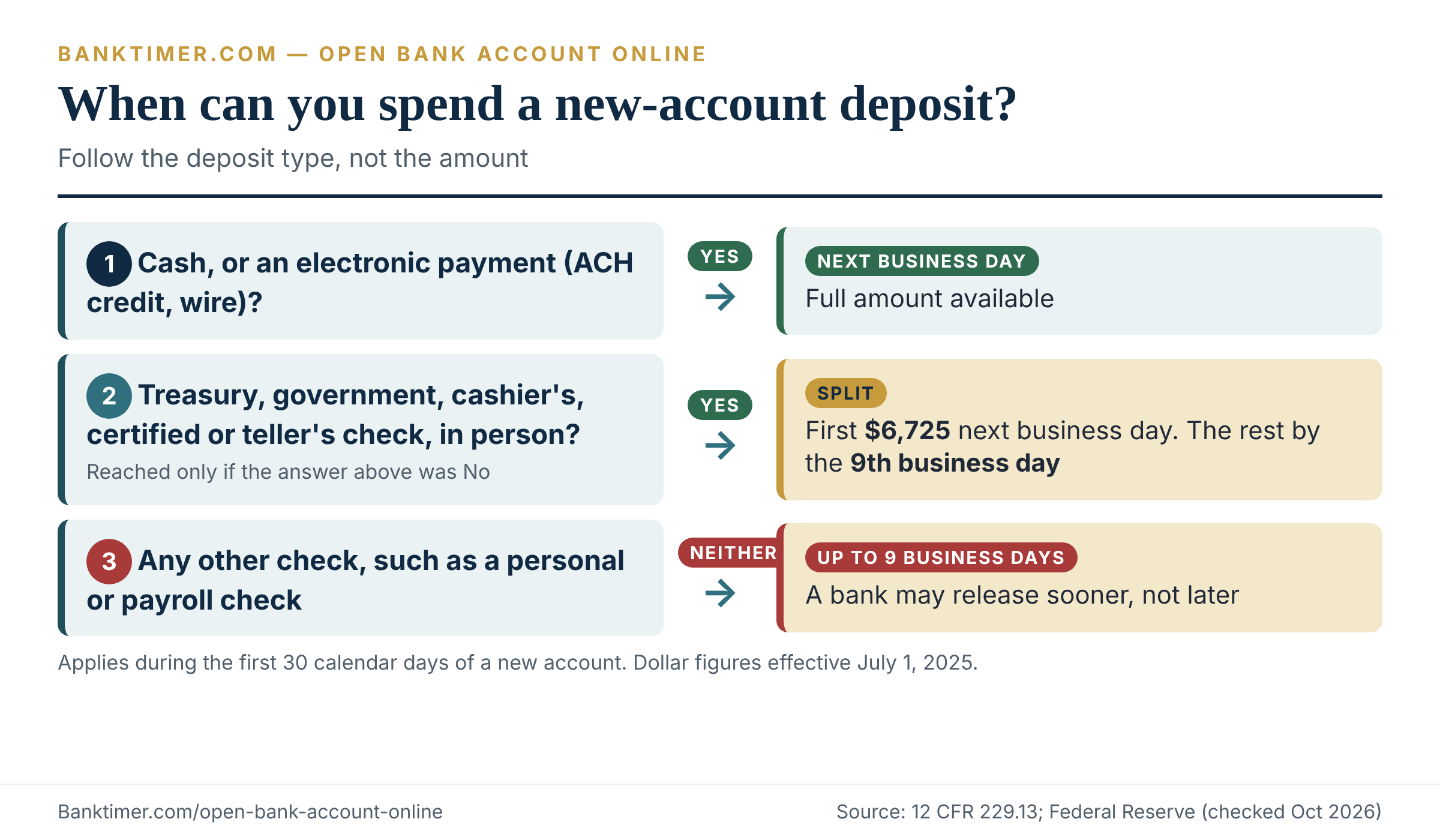
Holds on new accounts are legal. Cash and electronic payments get next-business-day treatment. Many checks can wait up to nine business days.
Fake sites are the main online risk. Type the address yourself or use a bookmark. Do not trust a sponsored search ad.
Numbers worth knowing before you start
Eleven figures do most of the work in this process. Some come from federal law, some from regulators, and one comes from a voluntary national standard. Keep the type column in mind, because a provider can be stricter than a federal minimum but cannot ignore it.
| Number | What it controls | Type | Source |
|---|---|---|---|
| $250,000 | Deposit or share insurance, per depositor, per institution, per ownership category | Federal insurance | FDIC; NCUA |
| 4 items | Name, date of birth, address, ID number collected before opening | Federal CIP rule | 31 CFR 1020.220 |
| 5 years | How long the bank keeps identifying records after the account closes | Federal CIP rule | 31 CFR 1020.220 |
| 12 months | One free checking-account report per reporting company | Federal law (FCRA) | CFPB |
| 5 years (up to 7) | Typical life of negative checking-account history | FCRA; regulator guidance | OCC; CFPB |
| 30 days | Window in which an account counts as “new” for hold rules | Regulation CC | 12 CFR 229.13 |
| $275 / $6,725 | Next-day check amount; new-account threshold (since July 1, 2025) | Regulation CC | Federal Reserve |
| 9 business days | Longest hold on many checks deposited to a new account | Regulation CC | 12 CFR 229.13 |
| $50 / $500 / 60 days | Tiers of your liability for unauthorized electronic transfers | Regulation E | 12 CFR 1005.6 |
| $10 | Interest amount that triggers a Form 1099-INT | IRS rule | IRS |
| $25 / $5 / $10 | Opening deposit and monthly fee ceilings in Bank On certified accounts | Voluntary standard, not law | Bank On |
The last row matters most for budget-conscious readers. It is a benchmark, not a legal limit. Provider-specific numbers, such as a bank’s minimum opening deposit, monthly fee or mobile-deposit cap, are deliberately missing here because they vary by institution and change without notice.
What happens between “Open account” and your first purchase
You click the button, the bank asks for ID, and a confirmation screen appears. That screen is not the finish line. Four separate processes still have to run before you can spend money with confidence.
Four clocks, four owners
The application clock covers your form and the identity check. It runs on the bank’s software and, if something looks off, on a human reviewer. The funding clock covers moving your first deposit in. It runs on payment networks and the bank’s posting rules.
The hold clock decides when deposited money becomes spendable. Federal rules set maximums, and the bank sets the actual release. The logistics clock covers the debit card in the mail and the day your employer’s payroll actually starts landing in the new account.
That is why a “ten-minute” account opening can still leave you without a working card for a week. The form took ten minutes. The rest of the open bank account online journey did not.
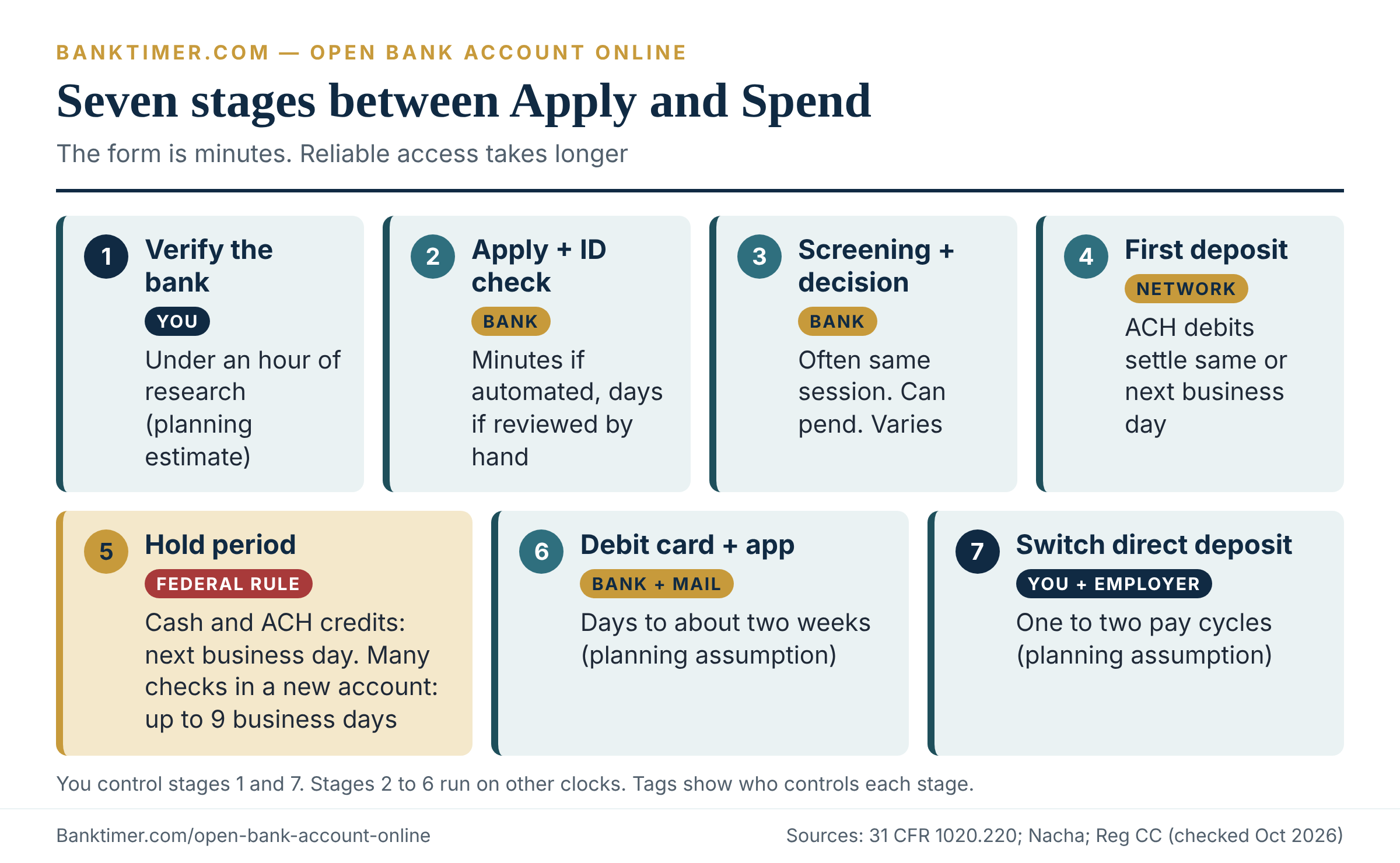
A stage-by-stage timeline
The table separates rules from habits. Where timing is set by federal rule or network rule, it says so. Where it depends on the provider, the cell says “varies” and names the driver.
| Stage | Typical timing | Who controls it | What you do |
|---|---|---|---|
| 1. Choose and verify the institution | Under an hour of research (planning estimate) | You | Check BankFind or NCUA; read the fee schedule |
| 2. Application and identity check | Minutes if automated; days if manually reviewed (varies by provider) | Bank | Have ID and addresses ready; answer document requests fast |
| 3. Screening and decision | Often the same session; can pend (varies) | Bank, reporting company | If denied, request the adverse action notice |
| 4. First deposit | ACH debits settle same day or next business day on the network; the bank’s posting policy varies | You, bank, payment network | Choose a funding method deliberately |
| 5. Hold period | Next business day for cash and electronic payments; up to nine business days for many checks | Federal rule, bank | Ask which deposits get held |
| 6. Debit card and app access | Varies by provider and mail; plan on days to about two weeks (planning assumption) | Bank, card network, mail | Keep your old card active |
| 7. Direct deposit and autopay switch | One to two pay cycles (planning assumption) | Employer, you | Switch gradually; keep the old account open |
Stage 4 is the only row where a network rule gives a hard number. Nacha, the ACH rulemaker, says its rules require ACH debits to settle the same day or the next business day. Settlement is not the same as availability, though. The bank still decides when the money posts to your balance.
Where the first week usually goes wrong
Three patterns cause most first-week trouble. Each is avoidable.
First, people deposit a personal check and assume it works like cash. Under the new-account exception, it may not (more in the holds section below). Second, people ignore the verification step for a linked outside account, so the account looks open but the transfer never starts. Third, people close or empty the old account the same day.
The fix for all three is the same: treat the first pay cycle as a test run. Keep the old account funded until the new one has handled one real deposit and one real bill.
Step 1: Verify the institution before you open bank account online
The phrase “open bank account online” sounds like one task. It is at least four. Two questions come first. Is this a real, regulated institution? And whose balance sheet will actually hold your deposit? Skipping either one is how people end up typing a Social Security number into a lookalike site.
Check a bank in FDIC BankFind
The FDIC’s BankFind tool lists FDIC-insured banks. FDIC consumer guidance tells people to use it to compare a website address against official records, and the FDIC will answer questions at 877-ASK-FDIC (877-275-3342). A “Member FDIC” badge on a page proves nothing by itself, because anyone can copy a badge.
Use this sequence before you share personal details with any unfamiliar name:
- Find the institution’s legal name in the footer or the “About” page.
- Search that name in FDIC BankFind.
- Compare the website listed there with the address in your browser bar, letter by letter.
- Type the official address yourself, or use a bookmark, for the application.
Check a credit union in NCUA’s tool
For a credit union, use NCUA’s Research a Credit Union tool. NCUA requires federally insured credit unions to display its official insurance sign on their websites. The sign says savings are “federally insured to at least $250,000 and backed by the full faith and credit of the United States Government.”
A credit union that does not show up as federally insured deserves a direct question about what protects your deposit. Do not accept a vague answer.
Fintech and neobank accounts: coverage passes through, but only partly
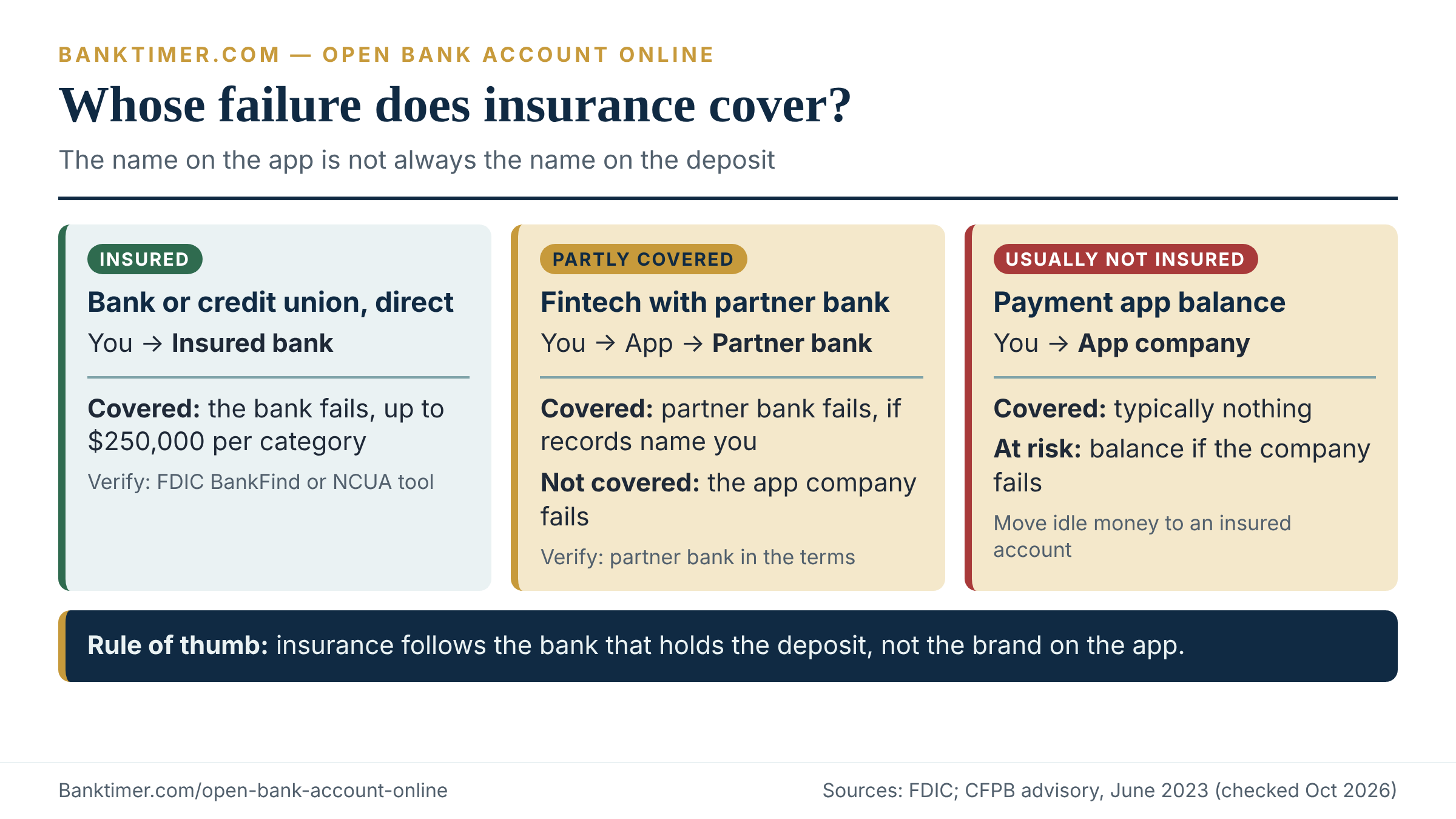
Many app-based “banks” are not banks. They are technology companies that partner with a chartered bank, and the partner bank holds the money. The FDIC says non-bank companies are never FDIC-insured themselves. Your funds gain protection only once they sit at an insured bank.
That arrangement is called pass-through coverage, and it has two limits. First, the records must identify who owns the money and how much each person owns. Second, as the FDIC puts it, deposit insurance does not apply if the non-bank company fails or files for bankruptcy. The CFPB makes the same point: pass-through insurance protects you if the partner bank fails, not if the app company does.
In a bankruptcy, the FDIC notes, recovering money from a failed non-bank can take a significant amount of time. So before you fund a fintech account with your whole paycheck, read the user agreement. Look for the partner bank’s name and for language about how deposits are recorded.
| Account type | Who holds the deposit | What federal insurance covers | What it does not cover | What to verify |
|---|---|---|---|---|
| Chartered bank, online or branch | The bank | Bank failure, up to $250,000 per ownership category | Investments sold at the bank; balances above the limit | Legal name and website in BankFind |
| Credit union | The credit union | Credit union failure, up to $250,000 under NCUA share insurance | Non-deposit products | NCUA tool; official insurance sign |
| Fintech account with partner bank | One or more partner banks | Partner bank failure, if records identify you as owner | Failure of the fintech company itself | Partner bank named in the terms; recordkeeping language |
| Payment app balance, no pass-through | The app company | Typically nothing | Failure of the app company | User agreement; move idle money to an insured account |
The fourth row is the one people overlook. A payment app can feel like a bank account while offering none of the protection of one. Banktimer’s view: use a payment app for moving money, not for storing it.
How the $250,000 limit works (illustrative)
The standard FDIC limit is $250,000 per depositor, per insured bank, for each account ownership category. NCUA uses the same figure for credit union members. The category part is where people miscount.
Illustrative example: one bank, three categories
Maria deposits $310,000 in a single-owner account at one bank. Only $250,000 is insured, so $60,000 sits above the limit.
Now take a couple. They hold a $400,000 joint account, plus $60,000 each in separate single-owner accounts at the same bank. Each co-owner’s share of the joint account is $200,000. Joint and single accounts are separate ownership categories, so every dollar is within the limits.
All figures are invented for illustration. Use the FDIC’s deposit insurance estimator for your own mix.
The practical rule: add up what you hold in each category at each institution, not across the whole financial system. For the wider rules on ownership types and account structures, the bank account guide is the place to start.
Step 2: Choose the account and read the fee schedule first
An account that opens in ten minutes can cost you for years. The fee schedule decides that, and whenever you open bank account online, it is one click away. Under Regulation DD, a bank must give you account disclosures before the account is opened. For electronic openings, that means before the account is opened online, covering fees, minimum balances and the conditions attached.
A decision framework: which provider type fits your situation
Skip the “best bank” lists. Start with three questions about how you will use the account.
- What will it do? Catch a paycheck, pay bills, hold savings, or all three.
- How will cash and checks arrive? Branch, ATM, mobile deposit or direct deposit only.
- What happens if you stumble? A low balance, a past account closure, or a late paycheck.
Your answers point to a provider type, not a brand. The matrix compares five types on identical criteria.
| Option | Best for | Main upside | Main downside | What to verify |
|---|---|---|---|---|
| Online-only bank | People paid by direct deposit who rarely handle cash | No branch network to fund; app-first | Cash deposits can be harder | How you deposit cash; ATM access and fees |
| Credit union | Members who qualify by employer, community or association | Member-owned; fee terms can differ (varies) | Eligibility rules; smaller ATM reach | Who is eligible; shared branching |
| Large bank, online opening | People who want branches plus an app | Branches, wide ATM reach | Fee waivers often depend on balances or deposits | Waiver conditions in the fee schedule |
| Fintech with partner bank | App-first users who like extra tools | Features and design | Pass-through limits; support varies | Partner bank; deposit recordkeeping |
| Second-chance or Bank On account | Past account problems, or fee-averse users | Built to avoid overdraft traps | Fewer features; may restrict limits | Certification; path to a standard account |
No row wins every time. A fee-averse reader who gets paid by direct deposit may do well with an online bank or credit union. Someone who deposits cash weekly may want a branch network. For account basics beyond opening, the checking account guide goes deeper, and the online bank account guide covers digital-only providers.
Open bank account online fees: the cost anatomy
Every deposit account charges for something. The question is whether the charges are avoidable for you. Use the CFPB’s opening checklist as your question list: ask about monthly maintenance fees, the balance needed to avoid them, ATM fees, whether direct deposit waives the fee, and overdraft policies.
| Cost item | Trigger | Typical basis | Avoidable? |
|---|---|---|---|
| Monthly maintenance fee | Holding the account | Flat monthly amount (varies) | Often, if you meet balance or deposit conditions |
| Overdraft fee | A payment exceeds your balance and the bank pays it | Per item (varies) | Yes, by declining optional coverage where the rules allow |
| Non-sufficient funds fee | A payment is returned unpaid | Per item (varies) | Yes, with alerts and a cushion |
| Out-of-network ATM fee | Using another bank’s ATM | Per withdrawal, plus the ATM owner’s charge | Yes, by using in-network ATMs |
| Paper statement fee | Choosing mailed statements | Monthly or per statement (varies) | Yes, by choosing e-statements |
| Incoming or outgoing wire fee | Sending or receiving a wire | Per wire (varies) | Sometimes |
| Account closing fee | Closing within a window, if the agreement has one | Flat amount (varies) | Check the deposit agreement before applying |
The bank account fees guide compares these costs in more depth. Here, one point matters more: a waivable fee is not a waived fee.
Illustrative example: the fee that waives itself, until it doesn’t
An account charges $12 a month, waived if your daily balance never drops below $1,500. Both numbers are invented.
Fall short in four months of the year and you pay $48. Never meet the condition and you pay $144 a year, or $720 over five years.
For comparison, the Bank On standards cap a non-waivable monthly fee at $5 ($60 a year) and a waivable fee at $10 ($120 a year). Bank On is a voluntary benchmark, not a legal ceiling.
The FDIC’s 2023 household survey shows why this matters. Among unbanked households, 42.3% cited not having enough money to meet minimum balance requirements as a reason. Minimum balances and fees keep real people out of the system.
Overdraft coverage is an opt-in you control
Federal rules give you a lever here. Under Regulation E, a bank may not charge an overdraft fee on an ATM or one-time debit card transaction unless you opt in. It cannot make other account services depend on your saying yes. If you decline, you must get the same account terms and features as customers who opt in. You can change your mind at any time.
The opt-in covers ATM and one-time debit card transactions. Overdrafts on checks and recurring payments follow your deposit agreement instead.
Consider the cost of “yes.” If a $35 overdraft fee (an invented figure) hit three times, you would pay $105 to complete purchases a declined card would have stopped for free. Many people decide a declined swipe is the cheaper outcome. That is a judgment call, but you should make it deliberately, not by clicking through a screen.
Step 3: Gather the details required to open bank account online
Banks do not ask for your ID because they are curious. A federal rule requires it. Having the details ready is the single biggest time-saver in the whole process, and it prevents the stalled applications that turn a ten-minute task into a week.
The four items every U.S. bank must collect
The Customer Identification Program (CIP) rule, 31 CFR 1020.220, requires a bank to obtain four pieces of information before it opens an account for an individual:
- Name.
- Date of birth.
- Address. A residential or business street address. Military applicants can use an APO or FPO box.
- Identification number. For a U.S. person, a taxpayer identification number, usually a Social Security number.
The bank must also verify that information through documents, through non-documentary methods, or both. It must keep the identifying records for five years after the account closes. And it must give you adequate notice that it is collecting the information to verify your identity.
Worth knowing
The CIP rule traces back to Section 326 of the USA PATRIOT Act, and regulators issued the final rule in 2003. It was written for branch counters and paper documents. That is why the rule talks about “documentary” and “non-documentary” verification, and why online banks now run identity checks on databases instead of photocopies.
Non-U.S. persons, ITINs and passports
The rule is more flexible for non-U.S. persons. Instead of a Social Security number, the bank may accept one or more of the following: a taxpayer identification number, a passport number and country of issuance, an alien identification card number, or the number and country of issuance of another government-issued document that proves nationality or residence and bears a photograph.
The CFPB’s opening checklist also lists a Social Security number or an Individual Taxpayer Identification Number (ITIN) for interest-bearing accounts. Tax rules add a second reason: if you do not give a payer your taxpayer identification number in the required way, the IRS says backup withholding of 24% can apply to interest.
The rule sets what banks may accept. It does not oblige every bank to accept every applicant. Whether a given bank takes an ITIN or a foreign passport online, or only in a branch, is provider policy. Ask before you apply, and get the answer in writing if the support channel allows it.
A 2025 change: banks may get your tax ID from a third party
On June 27, 2025, the OCC, FDIC and NCUA issued an order, with FinCEN’s concurrence, letting banks collect a customer’s tax identification number from a third-party source instead of directly from the customer. The Federal Reserve joined for banks it supervises on July 31, 2025. FinCEN described it as burden reduction.
The order is optional for banks, and they still need written, risk-based procedures. In practice, you may see one bank ask for your full number while another does not. Both can be compliant. Treat an unusual data request carefully, but do not assume a missing field is a red flag.
Other details applications commonly ask for
Beyond the legal minimum, many applications also ask for a phone number, an email address, your employer, and your expected account activity. Use a phone number and email you control. One-time codes and fraud alerts travel through them, and a typo can lock you out.
Gather your funding details too: the routing and account numbers of the account you will transfer from, or a check you plan to deposit. If you are a student or younger applicant, extra co-owner and document rules often apply, and the banking for college students guide covers them.
| Document or detail | Why you need it | Where to get it | How long to keep it |
|---|---|---|---|
| Unexpired government photo ID | Documentary identity verification | State motor vehicle agency; passport agency | Keep current; note the expiration date |
| Social Security number or ITIN | Tax reporting on interest | Social Security card; IRS notice | Memorize or store securely |
| Proof of current address | Resolves mismatches with your ID | Lease, utility bill, bank statement | Keep a recent copy until the account is active |
| Funding account details | Moves your first deposit | Your current bank’s app or a check | Until the transfer completes |
| Disclosures and fee schedule PDFs | Your contract record | Download at application | As long as the account is open |
| Confirmation emails and application number | Proof of dates if a hold or dispute arises | Your inbox | Until you have reviewed two statements |
| Adverse action notice, if denied | Gives you a free report and contact details | The bank, by law | Until any dispute is resolved |
Step 4: Complete the application, screen by screen
Every provider designs its flow differently. Most open bank account online forms follow the same logic, though. Knowing what each screen is for helps you spot the one that does not belong.
What each screen is asking and why
- Product and disclosures. You choose an account and see the fee schedule and terms. Under Regulation DD, an electronic opening must show these before the account opens.
- Personal details. The four CIP items, plus contact information.
- Identity notice and verification. The bank explains it must verify your identity. You may upload a photo ID, answer questions drawn from your records, or both.
- Consents. Electronic delivery, privacy choices, and the overdraft opt-in screen discussed earlier.
- Funding. Linking an outside account, depositing a check, or sending a wire.
- Credentials. A password and a second factor. Pick an authenticator or security-key option over text codes where the bank offers one.
Funding screens deserve extra care. Some providers offer instant linking, which asks you to sign in to your other bank through a window run by a third-party service. That option is legitimate at many providers, but it is also where phishing hides. The funding section below explains how to check it first.
What to scan in the deposit agreement before you click accept
You do not need to read every page of the deposit agreement. You do need to find six things. Search the PDF for each term.
- Fee schedule and waiver conditions. What triggers each fee, and what waives it.
- Funds availability policy. The bank’s own hold rules, which may be stricter than the federal minimums but cannot break them.
- Overdraft and returned-item terms. How items are ordered and what each costs.
- Closure and dormancy terms. When the bank can close the account, and any fee for closing early.
- Dispute resolution. Whether the contract limits where or how you can bring a dispute.
- Electronic communications. Which notices arrive only by email or in the app.
Contract terms differ from law. A fee schedule is a bank’s own price list. A funds availability policy must fit inside Regulation CC. Keep the distinction in mind when something looks off.
Joint applications and beneficiaries
A joint application means both owners complete identity verification. Both become account owners under the agreement. Banks commonly let either owner access all the money, but terms vary, so confirm that in the agreement. Problems on a shared account can also appear on the checking-account history of both owners, a point the CFPB lists among the reasons for denials. The joint bank account guide covers the trade-offs in detail.
Some applications also offer a payable-on-death or beneficiary field. The wording and legal effect depend on the institution and the state, so read the beneficiary designation guide before you fill it in casually.
Screening: what banks check besides your ID
Four different checks can happen during one application. People often lump them together as “the credit check,” which leads to bad decisions. A bank may run all four, one, or none.
The checking-account report is not your credit report
Banks and credit unions commonly consult checking-account reporting companies. The two largest, according to the CFPB, are ChexSystems and Early Warning Services. They record account openings, closures, and reasons for closure, including unpaid negative balances and suspected fraud.
The CFPB says Experian, Equifax and TransUnion typically do not hold your checking-account information. Its summary is blunt: it is possible to have a great credit score and a not-so-good checking-account report. Requesting your own report from ChexSystems does not hurt your credit scores, per the CFPB.
When a credit pull enters the picture
A hard inquiry happens when a lender reviews your credit after a credit application. The CFPB says hard inquiries can affect scores, while soft inquiries, such as checking your own report or a prescreened offer, do not.
A plain checking account is normally not a credit application. A product that bundles an overdraft line of credit, or a card, is one. Ask directly: “Will opening this account involve a credit inquiry, and if so, hard or soft?” Do not guess from the marketing.
The CIP rule also allows verification by comparing your information with data from a consumer reporting agency, a public database, or another source. Which source a given bank uses is its own choice. If you froze a credit file and the identity check fails, support can tell you which source failed. Never lift a freeze because an unsolicited message tells you to.
| Check | What it looks at | Who runs it | Can it hurt your credit score? | What you can do |
|---|---|---|---|---|
| Identity verification (CIP) | Whether the details match a real person | Bank or its vendor | Depends on the data source; ask | Ask which source and whether it leaves an inquiry |
| Checking-account report | Past openings, closures, unpaid balances, suspected fraud | ChexSystems, Early Warning Services | Not part of credit scores | Free report every 12 months; dispute errors; ask for a freeze |
| Credit report inquiry | Credit history, when you apply for credit | Bank, with a credit bureau | A hard inquiry can lower scores | Decline credit features you do not want |
| Internal bank review | Fraud flags, mismatched details, device signals | The bank | Not applicable | Reply quickly to document requests |
How to get your own checking-account report
Request it before you apply if you have any history of closed accounts. ChexSystems offers one free report a year plus a free score, and it will freeze your report on request. Early Warning Services provides one free report every 12 months. Both must respond within 15 days of a request, according to the CFPB’s company pages.
You are entitled to an additional free copy if a bank denies you based on one of these reports. That brings us to what happens when an application fails.
Step 5: Fund the account without creating a second problem
Most open bank account online applications end at a funding screen. Your funding method decides two things: how fast the account becomes usable, and how exposed you are to a hold. Choose it on purpose.
Six ways to move your first deposit
The table compares the methods on the same criteria. “Varies” means the answer lives in the provider’s own policy, not in a federal rule.
| Method | Typical speed | Typical cost | Main risk | What to verify |
|---|---|---|---|---|
| ACH transfer from a linked bank | Network debits settle same day or next business day; posting policy varies | Often free (varies) | Return if the source balance is short | The bank’s posting policy and return fees at the source bank |
| Micro-deposit verification | Adds days while two tiny deposits arrive (varies) | Free | Stalled linking; mistyped amounts | The deadline to confirm the amounts |
| Instant account linking | Faster verification (varies) | Free | Phishing; broad data-sharing permissions | The link service’s name; what data it can access |
| Wire transfer | Often same day, subject to cutoffs (varies) | Wire fees possible (varies) | Hard to reverse once sent | Account details confirmed through a number you already trust |
| Mobile or paper check deposit | Subject to holds; mobile limits vary | Usually free | Up to nine business days on a new account | Mobile deposit limits and the availability policy |
| Cash deposit at a branch or ATM | Next business day by federal rule when given to a bank employee | Cash-deposit network fees vary | Online-only banks may not accept cash | How and where you can deposit cash |
The mobile check deposit guide covers limits and timing in depth. For moving money between your own accounts, the instant bank transfer guide explains why fast does not always mean final.
How micro-deposits work, and why they are tiny
Micro-deposit verification proves you control the outside account. The bank sends two small credits, each under $1.00, to that account. You then report the amounts. Nacha’s rules, in force since September 16, 2022, require micro-entries to net out so you do not lose money. They also require the label “ACCTVERIFY,” which you should see on the outside account’s statement.
If you see ACCTVERIFY entries you did not expect, do not ignore them. Someone may be testing an account number. Check your activity and contact your bank through a number you already trust.
Interesting
Settlement is not availability. Nacha says roughly 80% of ACH volume settles in one banking day or less. Yet your bank can still choose when a transfer-in becomes spendable. The network is fast, and the bank’s risk controls are separate. That gap explains most “why is my money pending?” questions, and the pending transfer guide walks through them.
Instant linking: convenient, but check the window first
Instant linking asks for your online banking sign-in in a pop-up. Before you type anything, confirm three points. The pop-up should launch from the provider’s official site, which you reached by typing the address. The link service’s name should appear in the provider’s own help pages or terms. And you should see what data it requests.
If anything feels off, use micro-deposits instead. They take longer, but they never require your other bank’s password.
New-account holds: Regulation CC in plain English
A hold is the legal delay between when you deposit money and when the bank must let you spend it. It is the part of the open bank account online process that surprises people most. The Expedited Funds Availability Act and Regulation CC set maximum delays. Banks may release funds sooner than the maximum, and many do.
What the rules require on an established account
On an established account, the baseline is generous for cash and electronic money. Cash given to a bank employee must be available by the next business day. So must electronic payments, which Regulation CC defines to include wire transfers and ACH credits, such as direct deposit. Certain checks deposited in person also get next-business-day treatment, including Treasury, state and local government, cashier’s, certified and teller’s checks.
For other checks, the first $275 of a day’s deposits must be available the next business day. The rest follows a schedule: two business days for local checks and five for nonlocal checks. The CFPB adds that cutoff times cannot be earlier than 2 p.m. at branches or noon at an ATM, so a deposit after the cutoff counts as the next business day’s.
What changes in the first 30 days
An account counts as new for 30 calendar days after it is established, under 12 CFR 229.13. During that window, the bank can use the new-account exception. Cash and electronic payments still need next-business-day treatment. The first $6,725 of the other next-day items, such as cashier’s checks, must also be available the next business day. Anything above $6,725 can wait until the ninth business day. Other checks, like a personal check or a paycheck, can be held until the ninth business day.
Two clarifications matter. An account is not “new” if every customer on it already had another account at that bank for at least 30 days during the 30 days before opening. And whenever a bank extends a hold under one of these exceptions, it must send written notice. In person, that notice comes at the time of deposit. Otherwise it is due by the first business day after the deposit.
The dollar figures took effect on July 1, 2025. The Federal Reserve adjusts them every five years. One caution: the CFPB’s funds-availability page still shows older figures of $225 and $5,525 as of this check, so use the Federal Reserve’s numbers.
| Deposit type | Established account | New account, first 30 days | What it means for you |
|---|---|---|---|
| Cash given to a teller | Next business day | Next business day | Safest way to deposit if you need the money quickly |
| Direct deposit or other ACH credit | Next business day | Next business day | The best way to receive a paycheck into a new account |
| Wire transfer received | Next business day | Next business day | Fast, but check the incoming wire fee |
| Cashier’s, certified or government check, in person | Next business day | First $6,725 next business day; the rest by the ninth business day | Large checks over $6,725 can partly wait |
| Personal check or payroll check | First $275 next business day; the rest in two to five business days | Up to nine business days | Expect a delay; plan for it |
| Check deposited by mobile app or ATM | Same rules, with earlier cutoffs at ATMs | Up to nine business days for ordinary checks | Bank policy may be slower than the rule allows |
Illustrative example: the paycheck that arrived as a check
Illustrative example: when the first paycheck is a paper check
You open the account on a Monday and deposit an $1,800 personal check on Tuesday, day zero. Your $1,200 rent is due Friday, day three.
A bank using the new-account exception can hold the check until the ninth business day. Counting Wednesday as business day one, that lands on a Monday, 13 calendar days after the deposit. Friday’s rent payment could bounce, and the fees could cost more than the hold itself.
If the same $1,800 had arrived as a direct deposit, the bank would have to make it available by the next business day. All figures are invented for illustration.
The fix costs nothing. Ask your employer to switch to direct deposit, or deposit the paper check into your old account. Do not time a bill around a check hold.
What a hold is not
A hold on one deposit differs from a restriction on the whole account. Holds apply to specific deposits and have federal time limits. If the entire account looks restricted, read the bank account hold guide for causes and next steps. And if you worry that a hold is wrong, ask the bank to explain which exception applies and when the release date falls.
Sign-up bonuses: do the net math before you chase one
Bonuses can be worth taking, but a headline number is not the same as a gain. The terms usually include a deposit or direct-deposit requirement, a holding period, and conditions on fees or closing early. Terms vary by provider and change often. The bank bonus requirements guide breaks down typical conditions.
Net value, not headline value
Illustrative example: the $300 bonus
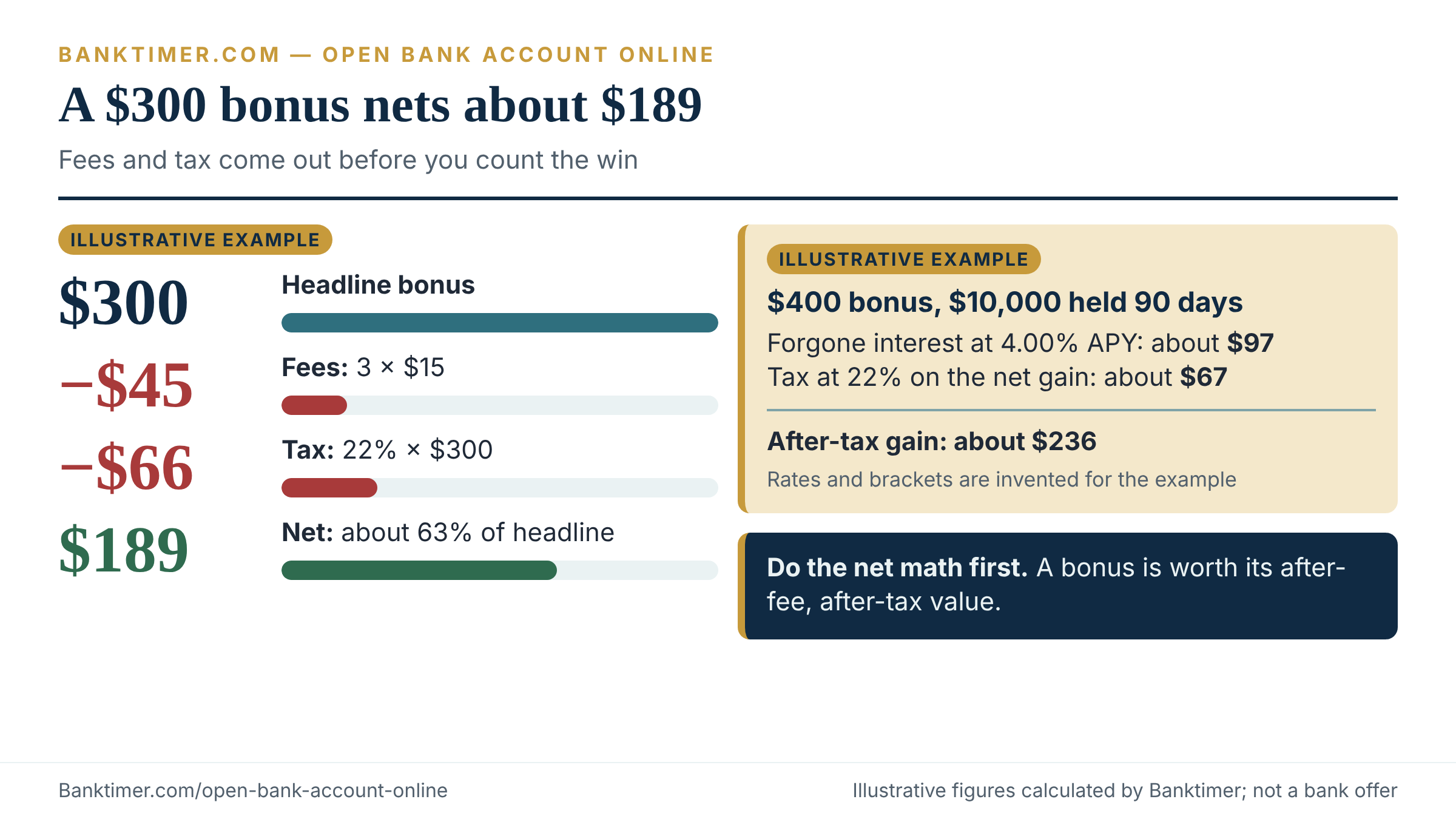
A bank offers $300 if you receive $4,000 in direct deposits within 60 days. Its monthly fee is $15 until a direct deposit waives it, and you pay it for three months. You are in a 22% federal bracket. These figures are invented.
- Fees: 3 × $15 = $45
- Federal tax on the bonus: 22% × $300 = $66
- Net: $300 − $45 − $66 = $189
The bonus nets about 63% of its headline value. That is still positive, and the effort is modest if your paycheck would have arrived anyway.
Illustrative example: the $400 bonus that locks up $10,000
A bank offers $400 if you hold $10,000 for 90 days. You would otherwise earn 4.00% APY elsewhere, and the new account pays 0.01% APY. Both rates are invented.
- Forgone interest: about $97.18; interest earned at 0.01%: about $0.25
- Pre-tax gain: $400 − $97.18 + $0.25 = $303.07
- Tax at 22%: about $66.68
- After-tax gain: about $236.39
The $400 headline becomes roughly $236. Whether that is worth the lock-up depends on whether you might need the cash.
How bonuses are taxed
Treat a cash bonus as taxable income. The IRS says most interest credited to an account you can withdraw from without penalty is taxable in the year it becomes available. It requires you to report interest even if you never receive a Form 1099-INT. Banks must issue the form when interest reaches $10.
The IRS instructions for Form 1099-INT also tell issuers to include amounts of $10 or more paid or credited to an account, whether or not the payer designates them as interest. Noncash gifts follow separate thresholds in Publication 550. Confirm how your bank reports a bonus, and ask a tax professional about your situation.
If the bank says no: reasons, rights and next moves
A denial feels final. It usually is not. The CFPB says banks deny checking accounts mainly because of negative information from a checking-account reporting company, and most of that information can be checked, disputed or resolved.
Why applications get denied
The CFPB lists three common triggers. The first is an unpaid negative balance, such as an overdraft you never repaid on an account the bank closed. The second is suspected fraud or a history of bad checks. The third is trouble on a joint account, including trouble caused by the other owner.
A fourth cause has nothing to do with history: the bank may be unable to verify your identity. Mismatched addresses, a name that differs from your ID, or a typo in your date of birth can stop an application cold. Check your entries before you assume the worst.
Your rights after a denial
If the bank denies you based on a report, it must send an adverse action notice that names the reporting company and gives its contact details. That notice entitles you to a free copy of the report.
Then compare the report with your own records. The CFPB’s process has two prongs. File a dispute with the reporting company, and file a dispute with the bank that supplied the data. The companies must conduct a reasonable investigation and correct inaccurate information. If they do not resolve it, you can add a statement explaining your side.
Timing matters too. Negative information generally stays on ChexSystems and Early Warning Services reports for five years, per the OCC, though federal law allows certain negative information for up to seven. If your entry is close to those dates, check whether it should have aged off.
Steps to take, in order
- Read the notice and note which reporting company the bank used.
- Request your free report from that company.
- Compare every entry with your records, including dates and amounts.
- Dispute errors in writing with the reporting company and the reporting bank.
- If the entry is accurate, ask the reporting bank how a repaid balance will be updated.
- Apply for a second-chance or Bank On account while the entry is still on your file.
Step 5 is a judgment call, not a guarantee. An unpaid balance is the most common documented trigger, so resolving it often helps. Ask the bank in writing what it will report afterward.
Second-chance accounts and Bank On
The CFPB notes that many banks and credit unions offer checking accounts and prepaid cards designed to prevent overdraft and overdraft fees. These are usually called second-chance accounts. They may have fewer features, so ask about monthly fees and how to move to a standard account later.
Bank On certification is a related benchmark. Its 2025–2026 national standards call for an opening deposit of $25 or less, no overdraft or non-sufficient funds fees, a free debit card, and a monthly fee of $5 or less ($10 or less if there are at least two ways to waive it). The standards also say certified accounts should deny customers only for past incidents of actual fraud. The Bank On site listed 520 certified accounts when checked in October 2026.
If your complaint is not resolved, the CFPB’s complaint intake accepts checking and savings accounts. And if an account that opened fine later gets closed, the closed account guide covers what to document.
Security: fake bank sites, lookalike apps and new-account fraud
Opening an account online means typing your most sensitive identifiers into a web page. That makes it a prime target. The threats here are about recognition and response, not paranoia.
Fake sites and sponsored ads
The FBI’s Internet Crime Complaint Center has warned that criminals buy search-engine ads to impersonate financial platforms. The fake sites look real and capture log-in details. The FBI’s advice is simple: check the URL for typos or a misplaced letter, and type the business’s address into your browser yourself.
A November 25, 2025 FBI alert covers account takeover through impersonation of financial institutions. It reported more than 5,100 complaints since January 2025 and $262 million in losses. Its advice includes bookmarking login pages and using multi-factor authentication. The alert also says companies generally do not contact you to ask for your username, password or one-time code.
Lookalike apps and unsolicited messages
Get the app from a link on the institution’s own site, which you reached by typing the address. Do not follow a link in a text message. The FTC reported in June 2026 that bank impersonation accounted for nearly $1 billion in reported losses in 2025. For pattern-level detail, see the bank impersonation scam guide and the account takeover guide.
The job offer that needs your new account
One scam asks you to open an account and use it to receive and forward money for an “employer.” The FBI lists this as a money mule red flag. People who act as mules, knowingly or not, can face fraud and money-laundering charges and lose their own accounts. No legitimate employer needs your personal account to move funds.
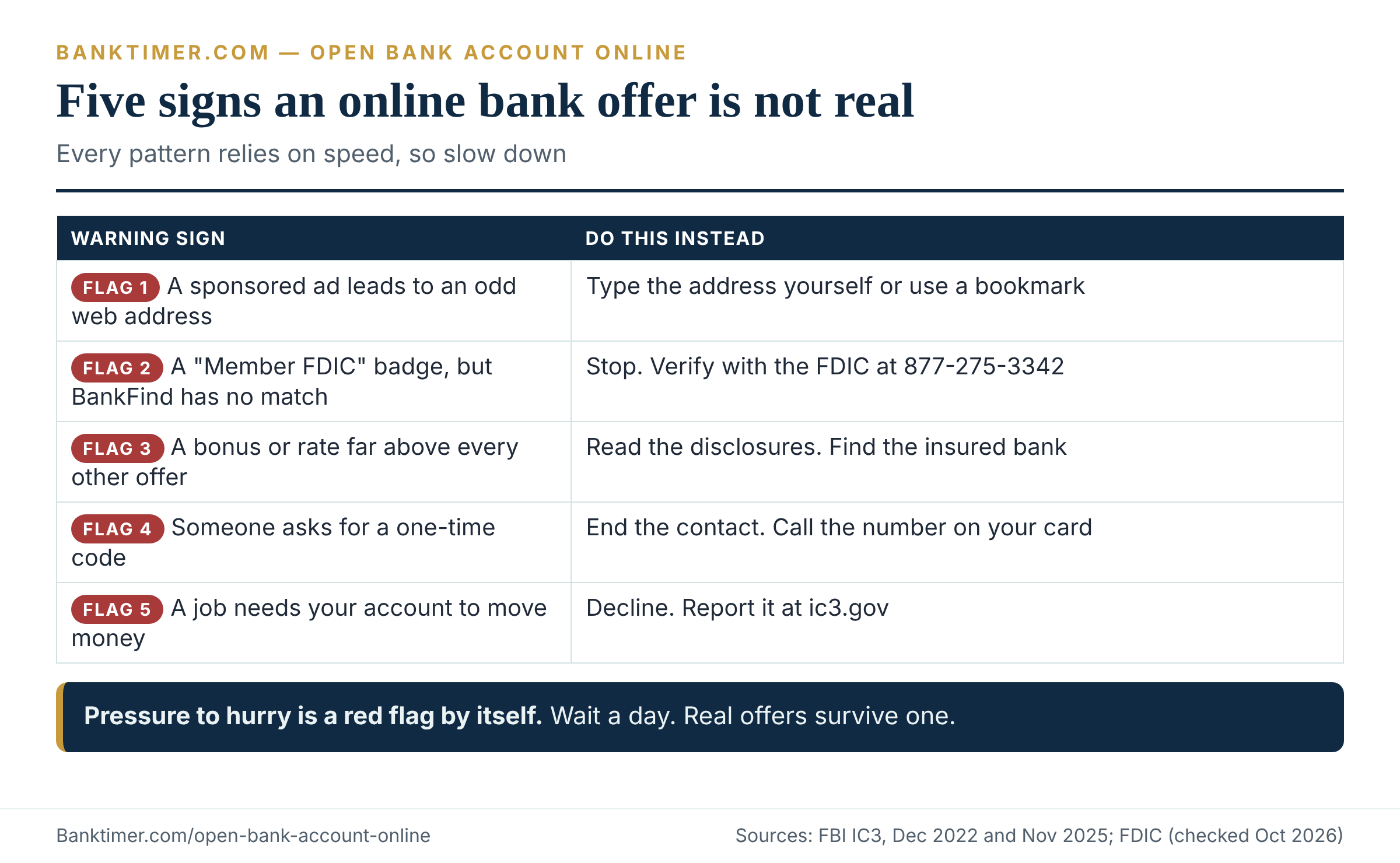
| Red flag | Why it matters | What to ask | Safer next step |
|---|---|---|---|
| A sponsored ad leads to a slightly odd web address | Lookalike sites copy real banks | Does BankFind list this exact address? | Type the address or use a bookmark |
| “Member FDIC” badge, but no match in BankFind | Badges can be copied | Which insured bank holds the deposit? | Stop and verify with the FDIC |
| A rate or bonus far above every other offer | Bait draws applicants | What are the real conditions? | Read the disclosures before sharing data |
| A request for a one-time code | Codes defeat your protections | Who contacted whom first? | End the contact; call the number on your card |
| A “fee” to activate or release the account | Real banks do not charge for approval | Where is this fee in the schedule? | Walk away |
| A job that needs your account to move money | Classic mule recruitment | Who benefits if the money is stolen? | Decline; report at ic3.gov |
| A deadline that expires in an hour | Pressure blocks checking | What happens if I wait a day? | Wait a day |
Your first-30-day security setup
Once the account opens, do four things the same day. Turn on multi-factor authentication. Set alerts for transactions and low balances. Save the bank’s official phone number from its website. And review the account weekly for the first month.
Regulation E gives you a clock to respect. If an unauthorized electronic transfer occurs, your liability is capped at $50 if you report within two business days of learning of the loss or theft of your card or access code, and $500 after that. Failing to report within 60 days of a statement showing the transfer can expose you to unlimited liability for later transfers. Reg E covers unauthorized transfers. Payments you were tricked into approving are a harder question, so call the bank immediately.
Switching to the new account without bouncing a bill
The CFPB’s advice is to open the new account first, update direct deposits and automatic payments, and keep both accounts until all transfers complete. Rushing the closure of the old account is how bills fail. Use the checklist below as a pace, not a rule.
Switching checklist
- ☐ Confirm the new account has handled one real deposit and one real withdrawal.
- ☐ List every autopay and direct deposit tied to the old account.
- ☐ Update employer payroll first; ask whether a split deposit is possible.
- ☐ Move bills one at a time, starting with the smallest.
- ☐ Keep enough cash in the old account to cover payments still in flight.
- ☐ Close the old account only after a full billing cycle with no activity.
Under federal rules, you can revoke a company’s authorization to debit your account. The CFPB says to notify the company in writing and tell your bank at least three business days before the next scheduled transfer. A stop-payment order may incur a fee.
Current context (as of October 2026)
A few developments change how this process works today. Each is tied to a source and a date.
Federal payments are electronic. Treasury phased out most paper checks for federal payments on September 30, 2025. It points people without accounts to FDIC’s GetBanked and MyCreditUnion.gov. Anyone still receiving a federal check should enroll in direct deposit.
Banks have new flexibility on tax IDs. The June 2025 order lets banks collect a tax identification number from a third party. It is optional for each bank.
Hold dollar thresholds rose. The Regulation CC figures changed on July 1, 2025, to $275 and $6,725. Expect banks’ policy documents to catch up gradually.
Overdraft rules shifted. Congress overturned a separate CFPB overdraft rule in 2025 before it took effect. The Regulation E opt-in framework described earlier remains the core federal rule.
Fraud losses keep growing. The FTC reported about $16 billion in fraud losses for 2025, roughly 25% higher than 2024.
Online is the norm. In the FDIC’s 2023 survey, 4.2% of households had no bank account. Among banked households, 48.3% used mobile banking as their primary access method. The FDIC has a 2025 survey in draft, so these figures may be updated.
Open bank account online mistakes that cost money, time and security
Most of the errors below are cheap to avoid. They show up often because the account-opening flow rewards speed over care.
Mistakes that cost money
- Treating a waivable fee as a waived fee. Check whether you will meet the condition every month.
- Saying yes to overdraft coverage by default. A declined purchase is usually cheaper than a fee.
- Chasing a bonus without the net math. See the examples above.
- Leaving a large balance at a fintech with no verified partner bank. Know whose balance sheet holds your money.
Mistakes that cost time
- Depositing a paycheck as a check in the first 30 days. Use direct deposit.
- Ignoring verification emails. A stalled micro-deposit step can leave an account unfunded.
- Applying at several banks in a row. The CFPB says ChexSystems collects data on account applications, so a pile of applications leaves a trail. Apply once, to the bank you chose.
Mistakes that cost security
- Entering details after clicking a search ad. Type the address.
- Reusing a password from another account. One breach should not open two doors.
- Skipping alerts. Reg E’s clocks start when you learn of a problem, so learn fast.
Questions to ask before you open bank account online
- ☐ Is the institution listed in BankFind or NCUA’s tool, and does the website match?
- ☐ What are the monthly fee, the waiver conditions, and every other fee I could trigger?
- ☐ Will opening this account involve a credit inquiry, hard or soft?
- ☐ What is your funds availability policy, and does it use the new-account exception?
- ☐ How does the account handle overdrafts, and can I decline coverage?
- ☐ Which funding methods do you accept, and what are the limits?
- ☐ Do you accept an ITIN or a foreign passport for online applications?
- ☐ How long until my debit card arrives, and what do I use in the meantime?
- ☐ If I am offered a bonus, what are the exact conditions and the posting date?
- ☐ Which bank holds the deposit if this is a fintech account, and how are deposits recorded?
- ☐ What is the fee for closing the account early, if any?
- ☐ How do I report fraud, and which number do you recommend I save?
Frequently Asked Questions
Can I open a bank account online without a Social Security number?
Sometimes. The federal Customer Identification Program rule lets banks accept an ITIN, a passport number, an alien identification card number, or another government-issued photo document from a non-U.S. person. It does not require every bank to accept them. Policies differ, and some banks route these applicants to a branch. Ask the bank before you apply, and expect a tax form (Form W-9 or similar) for interest-bearing accounts.
How long does it take to open bank account online?
The application usually takes minutes, but spending money safely takes longer. Identity checks can pass instantly or pend for days if a person reviews your file. A direct deposit or ACH credit must be available the next business day. A personal check in a new account can be held up to nine business days. Plan for a debit card to take days to about two weeks, and do not rely on it for a due date.
How much money do I need to open an account?
It depends on the account. The CFPB’s checklist says an opening deposit is typically between $25 and $100, but each provider sets its own minimum, so check the disclosure. Bank On certified accounts must require $25 or less. A separate minimum balance to avoid monthly fees may apply after opening, and that number usually matters more.
Does opening a bank account hurt my credit score?
Usually not. Checking-account screening uses reports from companies like ChexSystems and Early Warning Services, which are separate from credit reports. Requesting your own report does not hurt your credit scores. A credit feature, such as an overdraft line or a card, can trigger a hard inquiry, which can lower scores. Ask before you accept one.
Can I open an account online with past ChexSystems problems?
Often yes, through a second-chance or Bank On account. Start by requesting your free report and disputing errors with both the reporting company and the bank that supplied the data. Negative information generally ages off after five years, and federal law caps most at seven. Apply to accounts built for people with limited history rather than to many standard accounts in a row.
Is an online-only bank safe?
An online-only bank is as protected as a branch bank if it is FDIC-insured. The FDIC says both brick-and-mortar and internet-based banks can offer FDIC protection. Verify in BankFind, and confirm that the website address matches the one listed. For fintech apps, find the partner bank and read how deposits are recorded.
Why is my first deposit on hold?
A bank can hold some deposits during the first 30 days under Regulation CC’s new-account exception. Cash and electronic payments, such as direct deposit, still get next-business-day treatment. Many checks can be held until the ninth business day. The bank must send written notice when it extends a hold, and it may release funds sooner than the maximum.
Can I open a joint account online?
Usually, if both owners complete identity verification. Both become owners under the deposit agreement, and terms about who can withdraw what vary by institution. Problems on a joint account can appear on both owners’ checking-account histories. Read the agreement and the joint account guide in our library before you add someone.
Do I owe taxes on a bank bonus?
Generally yes. The IRS says you must report taxable interest even if you receive no Form 1099-INT, and the Form 1099-INT instructions call for including amounts of $10 or more paid or credited to an account whether or not designated as interest. Banks commonly report cash bonuses that way. Confirm with your bank’s tax form and a tax professional.
What should I do if I entered my details on a fake bank site?
Act immediately and contact the real institution. Call the number on the back of your card or on the official website you typed yourself. Change passwords for any account that shares them. Consider fraud alerts or freezes with the credit bureaus. Report the site to the FBI at ic3.gov and to the FTC. Do not wait to see whether something happens, because speed is your best protection.
Your next step
Before you open bank account online anywhere, look up that institution’s legal name in FDIC BankFind or NCUA’s Research a Credit Union tool, and write down the website address it lists. Then compare that address, letter by letter, with the one you plan to use for the application.
Banktimer Bottom Line
Opening an account online is quick, but reaching your first safe purchase takes planning. The variable that matters most is how your first deposit arrives. Direct deposit and cash rarely trigger the new-account hold, while a paper check can leave part of the money unavailable for up to nine business days. Verify the institution in FDIC BankFind or the NCUA lookup before you enter an identity number. Read the fee schedule before you chase a bonus, because fees and tax can shrink a $300 headline offer to about $189 in the illustrative example. Keep your old account funded until the new one has passed a full pay cycle. Deposit insurance protects you if a bank fails. It does not protect you from a fake site, so type the address yourself.
Methodology
This guide was researched on October 6, 2026, using primary official sources first: federal regulations, regulator guidance, agency consumer pages and agency press releases. Where a statute or rule text is cited, the guide used the Legal Information Institute’s posting of the Code of Federal Regulations. The Federal Reserve’s notice supplied the current Regulation CC dollar amounts.
Provider-specific numbers, such as minimum deposits, monthly fees, mobile-deposit limits and card delivery times, are never generalized. They appear only as invented examples labeled illustrative, or as the word “varies.” All dollar amounts in worked examples are illustrative, were calculated independently, and are not quotes of any bank’s offer. A 22% tax rate was assumed in the bonus examples.
Banktimer did not open accounts or test any provider for this article, and nothing here claims first-hand testing. Rules differ by state, institution and date. This article is general information, not legal, tax or financial advice. Check current terms with the institution, and consult a qualified professional for your situation.
Sources
- 31 CFR 1020.220: Customer identification programs for banks, Legal Information Institute, checked October 6, 2026
- Exemption order related to TIN collection and CIP requirements, FinCEN, June 27, 2025
- Understanding deposit insurance, FDIC
- Is my money insured by the FDIC?, FDIC Consumer News, July 2023
- Share insurance coverage, NCUA
- Checklist for opening a bank or credit union account, CFPB
- Why was I denied a checking account?, CFPB
- Regulation CC dollar thresholds effective July 1, 2025, Federal Reserve Consumer Compliance Outlook
- A guide to Regulation CC compliance, Federal Reserve
- Regulation E, section 1005.17: overdraft services, CFPB
- Topic no. 403, Interest received, IRS
- Cybercriminals impersonating financial institutions for account takeover, FBI IC3, November 25, 2025